By Shakhawat Ullah
11 Min Read
AI Product Photography for WooCommerce: The Complete 2026 Guide
Here’s a question worth asking: if two stores sell the exact same product at the same price, why does one consistently outsell the other?
Nine times out of ten, it’s because of the product presentation.
Product images are the closest thing to a physical store experience that online shoppers get. They cannot touch the fabric, test the weight, or try on the glasses.
The image has to do all of that work. When it fails, shoppers leave. When it works, they buy.
The problem has always been cost.
A professional studio shoot runs $25–$500+ per image. A 50-product WooCommerce catalog can cost $25,000 before you make a single sale.
AI product photography tools have changed that math completely. Per-image costs now run $0.05–$2.00, with output quality that matches studio results for most product categories.
This guide walks you through exactly how WooCommerce store owners are using AI to upgrade their product photos, create product page videos, and let shoppers virtually try products before buying.
How AI Product Photography for WooCommerce Works
AI product photography for WooCommerce uses machine learning to generate or transform product images. You upload a basic product photo and the AI outputs a professional lifestyle image, a clean studio shot, or an on-model photo for apparel.
For most WooCommerce catalog categories, AI matches studio output.
Three core capabilities cover most WooCommerce use cases:
- Background removal and replacement is the entry point. You upload a product photo, the AI strips the background, and places the product into a new setting – a marble countertop, a wooden surface, a seasonal lifestyle scene. This is the fastest way to upgrade a catalog that was shot on a kitchen table.
- Scene generation goes further. Instead of placing your product on a pre-made background, the AI builds a complete environment around it with accurate lighting, shadows, and reflections that match the scene. A candle appears on a moody evening table. A handbag sits in a sun-lit street setting.
- On-model generation matters most for apparel and accessories. You upload a flat-lay or hanger photo; the AI maps the garment onto a virtual human model with realistic drape, fit, and texture simulation. This replaces what previously required a model casting call and a full studio day.
💡 Pro Tip: How to Get the Best Results from AI Product Photography
AI amplifies what you give it. For product photography, a sharp, well-lit base photo on a plain neutral background consistently produces professional-grade AI outputs.
A dark, blurry, or cluttered source image produces inconsistent results regardless of the tool. Start with clean inputs and let AI do the rest.
Cut Your WooCommerce Product Photography Costs by Up to 80% With AI
The real cost of traditional product photography goes beyond the per-image rate. Studio rental, model fees, and post-production can push a 50-product catalog shoot past $25,000.
Research on lifestyle images versus plain white-background product shots consistently shows conversion rate improvements of 20% or more when visuals connect the product to a real-world context. Previously, testing this required commissioning a full lifestyle shoot on a hypothesis.
AI drops that same catalog to under $100. Per-image AI generation is considerably cheaper with turnaround measured in hours, not weeks.
The savings compound when you factor in speed. Traditional photography for a 50-product catalog takes weeks from booking to final deliverables.
AI generates the same volume in hours.
For a store updating seasonally, that time difference is as commercially significant as the cost difference.
| Traditional Photography | AI Product Photography | |
|---|---|---|
| Cost per image | $25–$500+ | $0.05–$2.00 (depends on model API costs) |
| On-model shoot | $2,000–$5,000+ | $0.04–$1.00/image |
| 50-product catalog | $1,250–$25,000+ | $2.50–$100 |
| Turnaround | Days to weeks | Hours |
| New variation | Another shoot cost | Near-zero |
The cost reduction also unlocks something that was previously too expensive: systematic A/B testing.
For example, have a look at this normal product page.
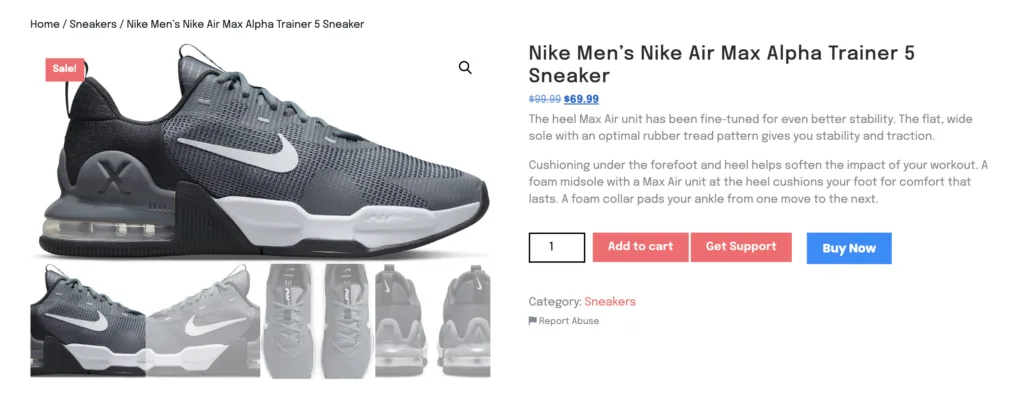
Looks generic, right? Too many stores have similar image styles.
What happens if we overhaul the images with a few lifestyle and model photoshoots showcasing the sneaker in much more detail?
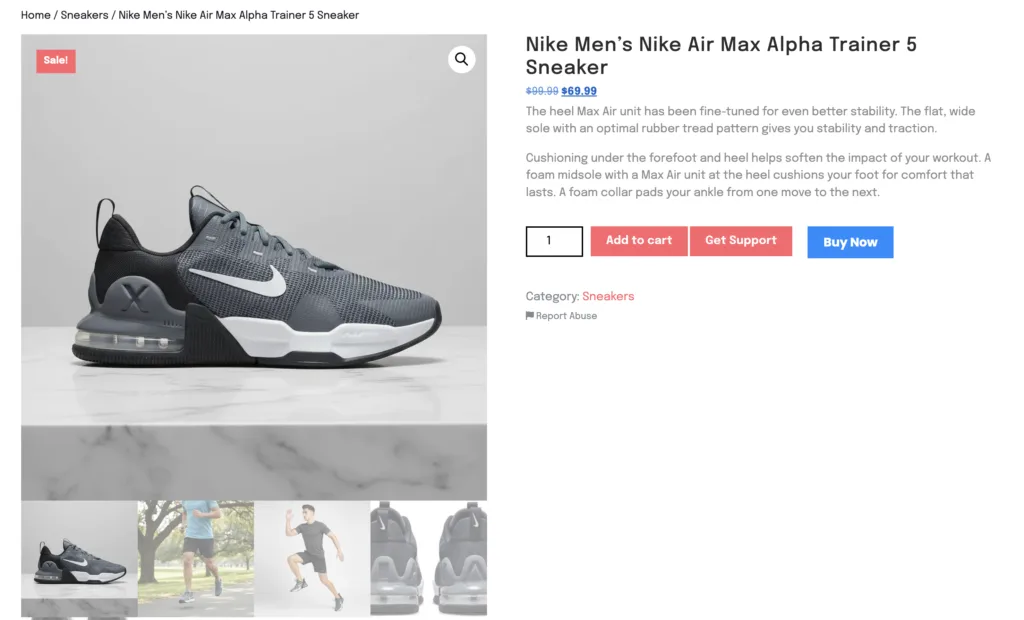
This does a very simple thing. It shows your customers, visually, how it will look on real life scenarios.
Images are the backbone of your WooCommerce store, and you must be focusing a lot more on how you present your products.
How to Add Product Videos to WooCommerce Pages Without a Camera
AI video generation takes your existing product still images and converts them into short 5–15 second clips showing the product with motion, from different angles, or in a lifestyle context.
For WooCommerce, these videos add to the product gallery or featured video section. No camera, no editing software, no production day required.
Product videos on WooCommerce product pages increase purchase confidence in a way that images alone cannot.
Shoppers who watch a short product video understand the item better, have clearer expectations, and return it less often. The barrier has always been production time and cost.
AI generative video removes that barrier. You take your existing product photos, the ones you already have in your WooCommerce media library, and the AI outputs a short, smooth clip showing the product moving, rotating, or placed in a lifestyle context.
For WooCommerce stores, these videos embed directly into the product gallery. For example, have a look at the same product page, but with an embedded video of the sneaker.
Adding Videos to WooCommerce Product Page
A customer browsing the sneaker sees it move. A customer looking at jewelry sees it rotate and catch light. A customer considering skincare sees the texture up close, in motion.
AI-generated product videos work particularly well for:
- Apparel and accessories showing drape, movement, and how the product sits on a body
- Jewelry and cosmetics showing texture, surface finish, and fine detail that static images flatten
- Lifestyle and home products showing the product in a real-world context with ambient motion
The video does not need to be elaborate. A 10-second clip that shows your product clearly from two angles does more for purchase confidence than a static image, at a fraction of the cost of traditional video production.
Virtual Try-On for WooCommerce: Reduce Returns and Lift Conversions
Virtual try-on lets shoppers upload a photo or use their camera to see exactly how a product looks on their own body, face, or in their own space.
Shopify’s 2024 commerce benchmarks show AR try-on experiences deliver conversion rate increases of up to 65% and return rate reductions of up to 40%. The mechanism is simple: confidence replaces uncertainty.
Returns cost WooCommerce stores in three ways: reverse shipping, restocking time, and the lost sale when the item sits in a returns queue.
Apparel consistently has the highest return rate in eCommerce, and most apparel returns trace back to fit anxiety – the shopper was not confident enough in how it would look on them.
Virtual try-on solves this at the source. The shopper visualizes the product on themselves before buying, which means they buy once, with accurate expectations, and keep it.
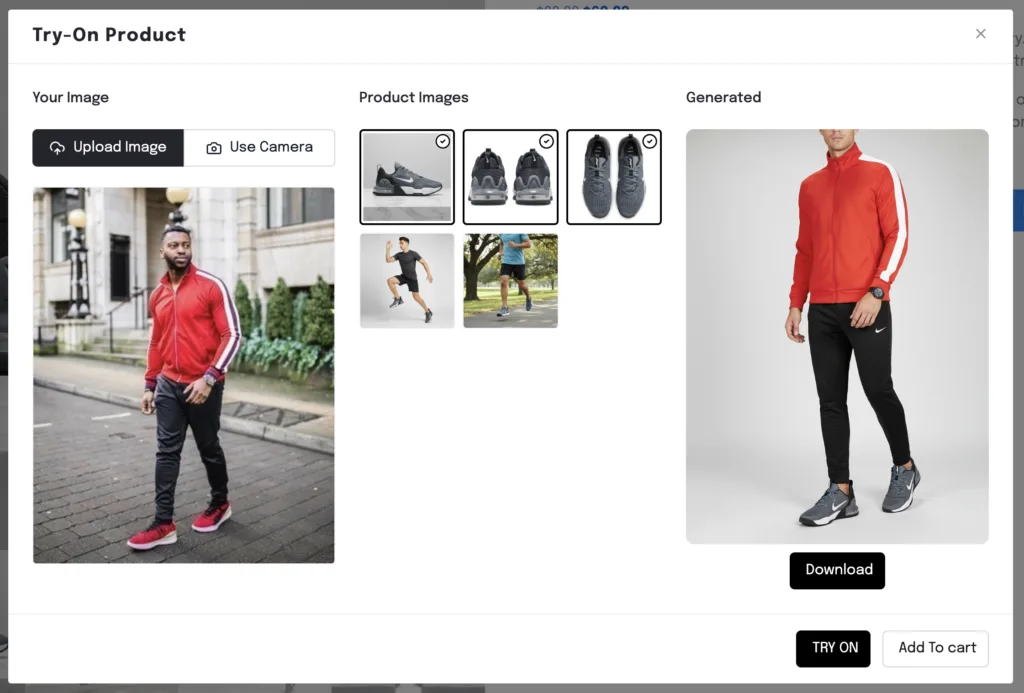
Virtual Try-On Feature in TryAura
For WooCommerce stores, virtual try-on works across several categories:
- Clothing : Shoppers see the garment on their own body type, removing the “will this fit me?” hesitation
- Accessories : Glasses, watches, and jewelry previewed on the shopper’s actual face or wrist
- Cosmetics : Lipstick, foundation, and eyeshadow shown on the shopper’s own skin tone
- Home goods : Product placed in the shopper’s actual room using their phone camera
The Diversity Advantage
AI also lets you display the same garment on diverse body types, ages, and ethnicities without casting multiple models.
Research from Nielsen Norman Group confirms that showing diverse models on product pages meaningfully improves purchase rates — shoppers buy more confidently when they see the product on someone who looks like them. AI makes this accessible to any WooCommerce store, regardless of budget.
When to Use AI vs. Traditional WooCommerce Product Photography
AI product photography handles 70 to 80% of most WooCommerce catalog needs reliably.
For the remaining 20–30%, transparent glass, highly reflective surfaces, complex lace patterns, and fine jewelry micro-detail, traditional photography still produces more accurate hero images.
Use AI for secondary shots, backgrounds, and seasonal variations in those categories.
For everything else – the majority of most WooCommerce catalogs – AI handles the workflow better, faster, and cheaper.
You can follow this simple framework:
| Product Type | Recommended Approach |
|---|---|
| Simple hard goods (mugs, boxes, bags) | Fully AI-generated |
| Apparel and soft goods | AI on-model + one traditional flat-lay hero |
| Jewelry and fine accessories | Traditional hero + AI background for secondary |
| Clear, glass, or reflective products | Traditional photography only |
| Home goods and lifestyle products | AI scene generation + AR try-on |
Start with your top 20 products by revenue. Generate AI variations. Test them for four weeks. Track conversion rate and return rate. The data will tell you where AI adds the most value for your specific catalog.
TryAura: AI Product Photography Built Natively for WooCommerce
Most AI product photography tools require you to leave WooCommerce, process images externally, and re-upload. TryAura runs natively inside the WooCommerce Product Editor and Media Library.
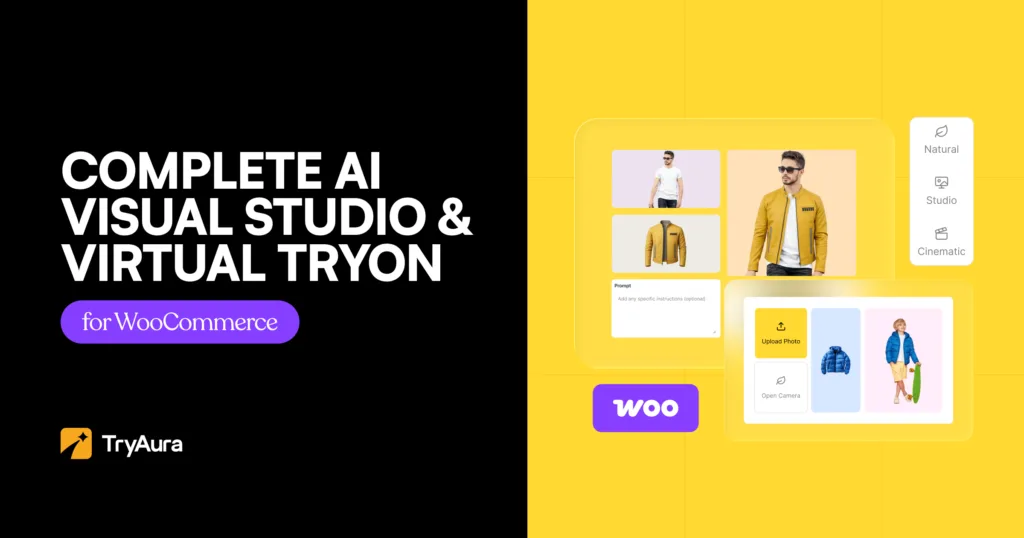
Generate images, product videos, and virtual try-on experiences without leaving your dashboard.
What TryAura includes:
- AI product image generation – lifestyle, on-model, studio, and background swap
- Short product video creation directly from still images
- Virtual try-on for clothing, accessories, and cosmetics
- Background presets and custom prompt control
- Blog featured image and video thumbnail generation
- YouTube and self-hosted video embeds on product pages
- Analytics dashboard tracking all image and video generations
A free Lite version is available on WordPress.org with unlimited image generation and virtual try-on. The Starter plan adds video generation, camera motion controls, and removes TryAura branding from the try-on widget. 14-day money-back guarantee on all paid plans.
Frequently Asked Questions
What is AI product photography?
AI product photography for WooCommerce uses artificial intelligence to generate or improve product images. You upload a base photo and the AI places your product into a professional lifestyle setting, removes and replaces backgrounds, or generates on-model shots for apparel. Per-image costs run $0.05–$2.00, compared to $25–$500+ for traditional studio photography.
Can AI product photography work natively inside WooCommerce?
Yes. Tools like TryAura run directly inside the WooCommerce Product Editor and Media Library, so you can generate, preview, and attach AI images and videos to product listings without downloading and re-uploading files. This is significantly faster than standalone web-based AI tools that require you to export, process, and re-upload every image manually.
How do AI product videos work on a WooCommerce product page?
AI video generation takes your existing product still images and converts them into short 5–15 second clips showing the product with motion or from different angles. In WooCommerce, these add to the product gallery or featured video section. Shoppers get a richer sense of the product with no camera, editing software, or production day required.
Does virtual try-on actually reduce returns?
Yes. Shopify’s 2024 commerce benchmarks show AR try-on experiences reduce return rates by up to 40% and increase conversion rates by up to 65%. Shoppers who can visualize a product on themselves buy with more confidence and arrive at accurate expectations before the order ships.
What product types work best with AI photography?
AI works best on apparel, soft goods, lifestyle items, beauty products, and accessories. It struggles with transparent glass packaging, highly polished reflective metal, and very fine jewelry detail. For those categories, use traditional photography for the hero image and AI for secondary lifestyle shots and seasonal background variations.
How much does AI product photography cost for a WooCommerce store?
Per-image AI generation costs $0.05–$2.00 depending on the tool. With a BYOK model like TryAura, API costs run under $20 per month for most stores, plus the annual plugin fee ($39 per year). A 50-product catalog that costs $1,250–$25,000+ with a traditional photographer costs under $100 with AI tools.
Stop Guessing. Start Testing What Actually Sells
AI product photography for WooCommerce is not a trend you need to prepare for. It is the cost structure your competitors are already running on, and the gap between stores using it and stores ignoring it is widening every quarter.
The stores still paying $200 per image are not getting better photos. They are getting slower iteration, higher fixed costs, and no data on what actually converts.
All in all, you’ve got to master your AI Product Photography to upgrade your store’s product presentation, and deciding where to start is the best first step.
Pick one product. Generate three AI variations for its image this week.
Run them for two weeks against your current image. That single test will tell you more about your store’s visual performance than any guide can.
Category:
Tags: