By Shakhawat Ullah
28 Min Read
What Is AI Virtual Try-On and How Does It Work for eCommerce?
A customer lands on your product page. They like the product. The price feels reasonable. The photos look good. For a second, it feels like they are ready to buy.
Then the doubt starts.
Will this fit me?
Will this color suit my skin tone?
Will these glasses look right on my face?
Will this necklace look too small in real life?
That tiny moment of uncertainty is enough to slow down a purchase, delay a decision, or send the customer looking for another option.
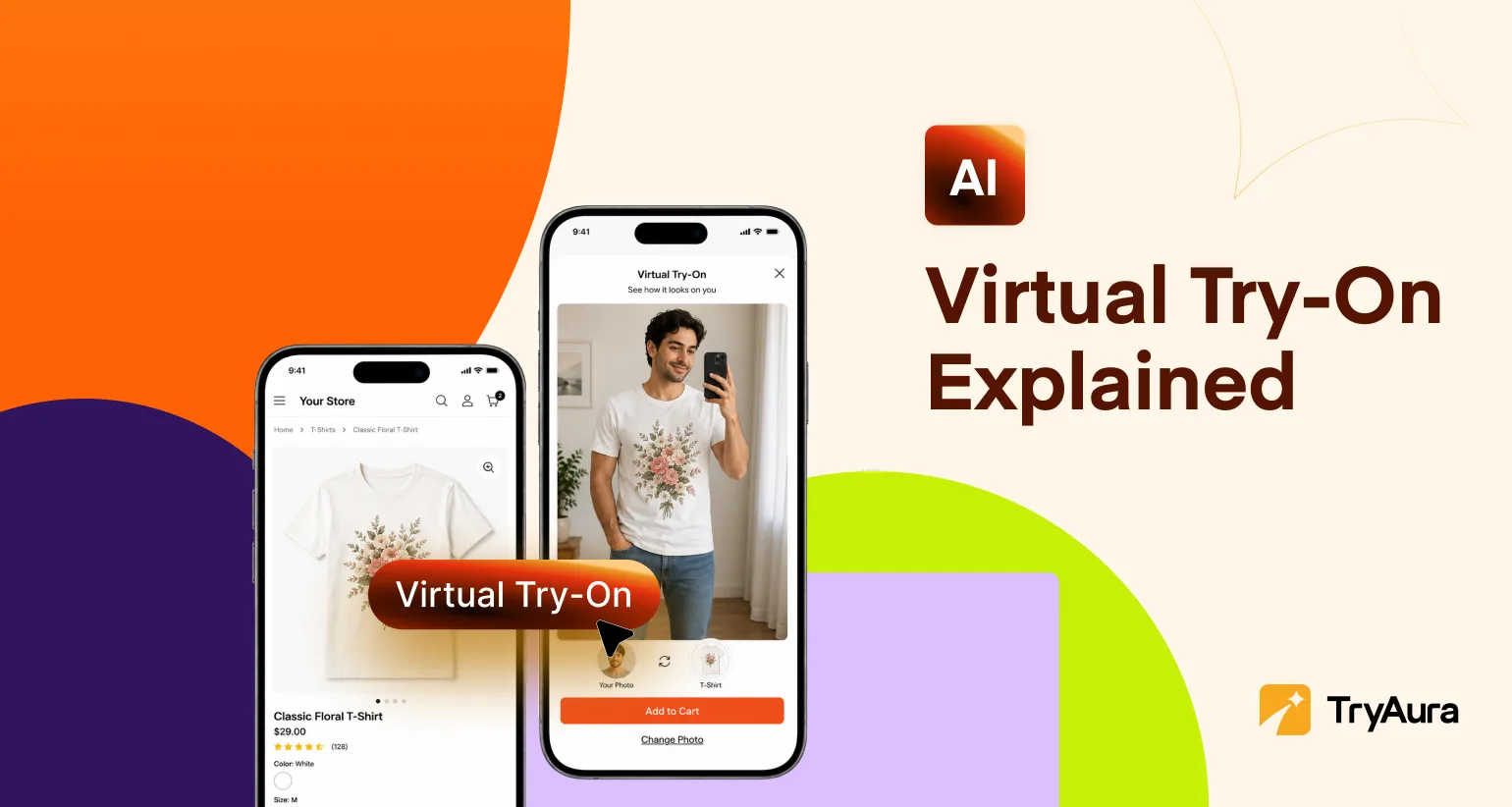
AI virtual try-on helps reduce that hesitation by giving shoppers a clearer preview before they buy. Instead of asking them to imagine how a product might look on them, it lets them see a realistic version of it on their face, body, hand, or uploaded photo.
In this guide, we’ll explain what AI virtual try-on is, how it works for eCommerce, which products it works best for, how accurate it really is, and what store owners should look for before adding a virtual try-on solution to their online store.
In Short
AI Virtual Try-On is software that creates a visual preview of a product on a shopper using artificial intelligence, augmented reality, computer vision, or image generation. It helps online stores reduce uncertainty by showing customers how items such as clothes, glasses, watches, jewelry, accessories, or beauty products may look on them before purchase.
There are three common approaches:
- AR Try-On, where a digital product is placed over a live camera view.
- Image-Based AI try-on, where AI generates a new image of the shopper wearing or using the product.
- Avatar or size-based try-on, where the system uses body data, measurements, or a digital model to estimate fit.
AI Virtual Try-On works best when the product is visually driven and the shopper needs confidence before buying.
It can support better conversion and fewer avoidable returns, especially when returns are caused by poor fit, wrong style expectations, or uncertainty. But it is not magic, and it should not be treated as a perfect size predictor for every body, fabric, lighting condition, or product photo.
What Does Virtual Try-On Mean?
Virtual try-on means a shopper can preview a product digitally before buying it online. In this context, “virtual” simply means simulated on a screen. It is not imaginary. It is a digital representation of a real shopping decision.
Think of it as a fitting room, mirror, makeup counter, or jewelry tray that appears inside the product page.
A virtual try-on solution for an online store usually lets shoppers do one of these things:
- See glasses, earrings, watches, rings, or hats on a live camera view.
- Upload a photo and preview clothing, accessories, or beauty products.
- Choose a model with a similar body type, skin tone, or style.
- Generate a realistic image of a product being worn or held.
- Compare variations such as color, size, style, and finish.
The goal is not only to look cool, although, yes, it can look very cool. The real goal is to reduce the mental gymnastics shoppers do when they are trying to imagine fit, scale, color, and style from flat product photos.
Why AI Virtual Try-On matters for eCommerce
Online shopping is convenient, but it also asks customers to guess a lot.
They guess whether a shirt will fall loosely or cling. They guess whether a ring will look delicate or chunky. They guess whether a lipstick shade will look elegant or like they lost a fight with a raspberry smoothie.
That guessing creates two problems for eCommerce stores:
- Shoppers hesitate: They browse, compare, zoom in, read reviews, check the size chart, reopen the product image, and then quietly disappear. The cart never happens.
- Shoppers buy with uncertainty: When the item arrives and does not match the mental picture they had, it comes back. That means refunds, return shipping, restocking, support tickets, and possibly inventory that can no longer be sold as new.
The returns problem is especially painful in apparel. According to Coresight Research, the average return rate for online apparel orders was 24.4%, mainly due to the size & fit concerns from customers.
This does not mean virtual try-on will magically make returns vanish. If a product is poorly made, sized incorrectly, photographed badly, or described with the enthusiasm of a tax form, virtual try-on alone will not save it.
But it can help with one of the biggest problems in online shopping – it gives customers a better preview before they commit.
How Does Virtual Try-On Work?
Most AI Virtual Try-On systems follow a similar system, even if the technology underneath differs.
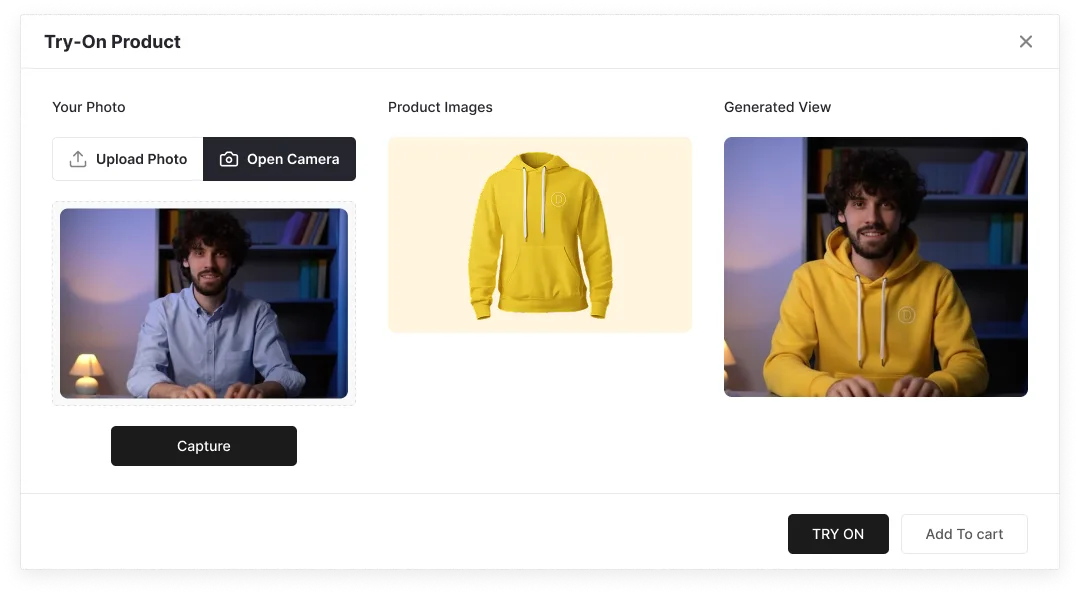
Step 1. The shopper provides an input
The input may be a live camera feed, uploaded photo, full-body image, face image, hand image, or a selected model.
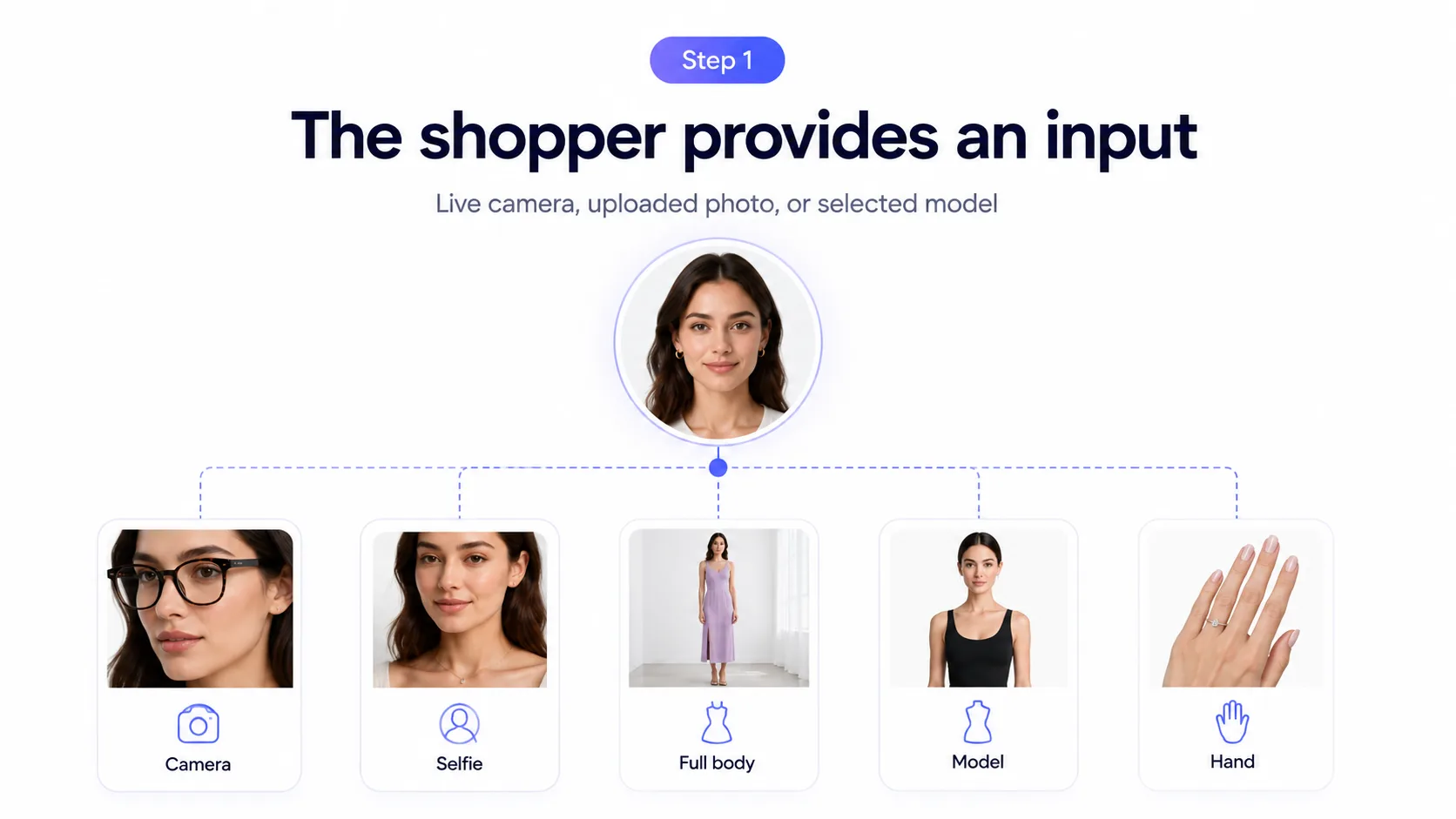
For example, a shopper might:
- Open the camera to try on glasses.
- Upload a selfie to preview a necklace.
- Upload a full-body photo to try on a dress.
- Choose a model close to their body type.
- Use a hand camera view to test a ring or nail color.
The better the input, the better the result. Blurry photos, awkward poses, harsh shadows, and cluttered backgrounds make the AI work harder. AI is talented, but it still appreciates not being handed a photo that looks like it was taken during an earthquake.
Step 2. Computer vision detects the person
The system uses computer vision to identify important points on the image or live camera feed.
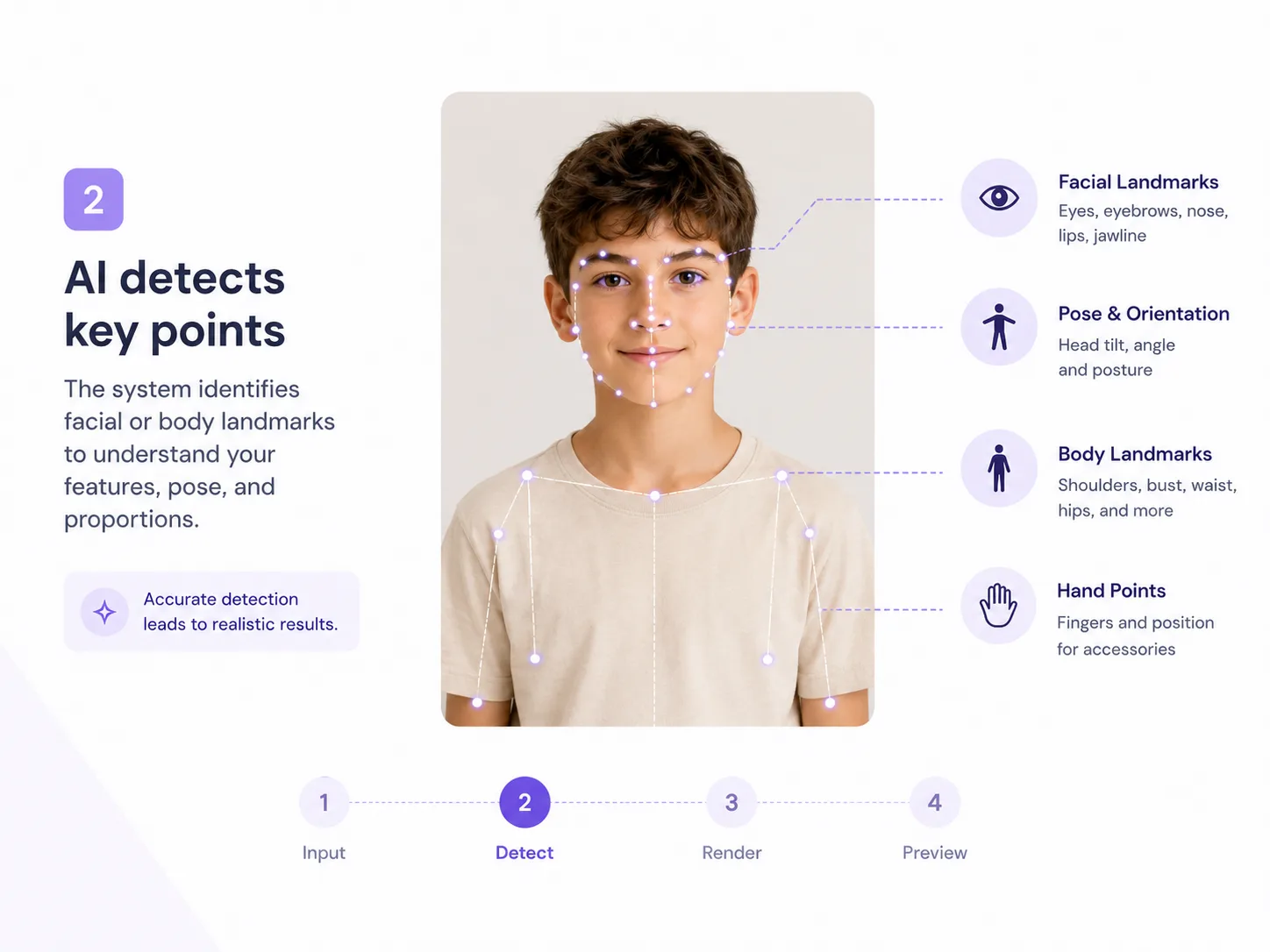
For face-based try-on, it may detect eyes, nose, ears, jawline, lips, or cheek structure. For hand-based try-on, it may detect fingers, knuckles, wrist position, and hand angle. For clothing, it may detect shoulders, arms, torso, waist, legs, pose, and body outline.
These detected points are often called landmarks. They help the software understand where the product should go.
A pair of glasses needs to sit on the nose and ears. A bracelet needs to wrap around the wrist. A shirt needs to align with the shoulders, torso, sleeves, and pose.
Without detection, the preview would be guesswork. And nobody wants earrings floating near their forehead like tiny confused satellites.
Step 3. The product is prepared for try-on
The software also needs to understand the product.
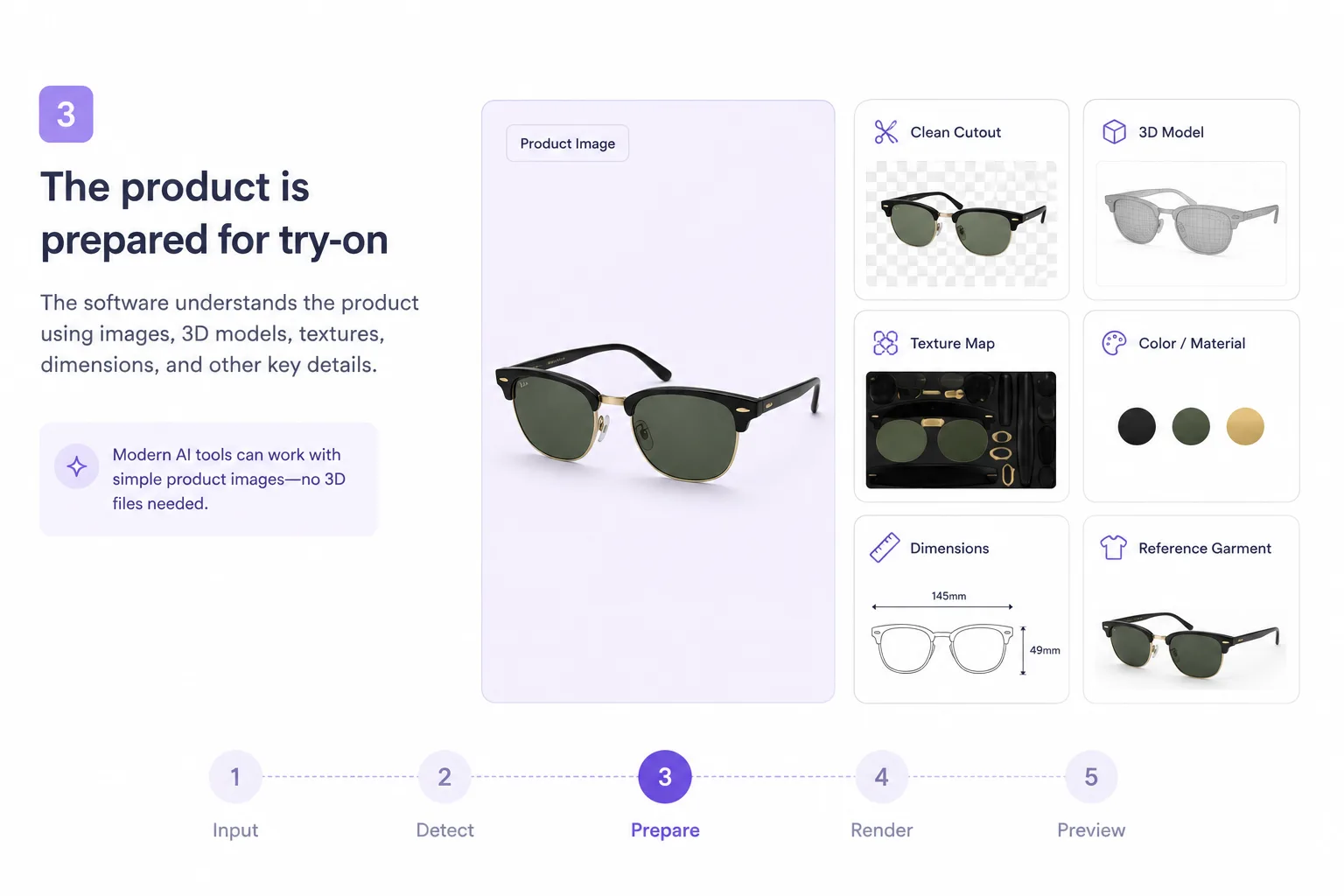
Depending on the tool and category, this can involve:
- A normal product photo
- A clean cutout image
- A 3D model
- A texture map
- A color or material profile
- Product dimensions
- A reference garment image
Older virtual try-on tools often needed 3D assets, especially for AR. Newer generative AI tools can often work from product images, which makes the process more accessible for small and medium-sized online stores.
This is important because most store owners do not have a secret folder full of perfect 3D files. They have supplier images, product photos, and a growing suspicion that “quick product update” is never quick.
Step 4. The preview is rendered
This is where the main technology kicks in.
For AR try-on, the software overlays a digital product onto the live camera view. When the shopper moves, the product moves with them.
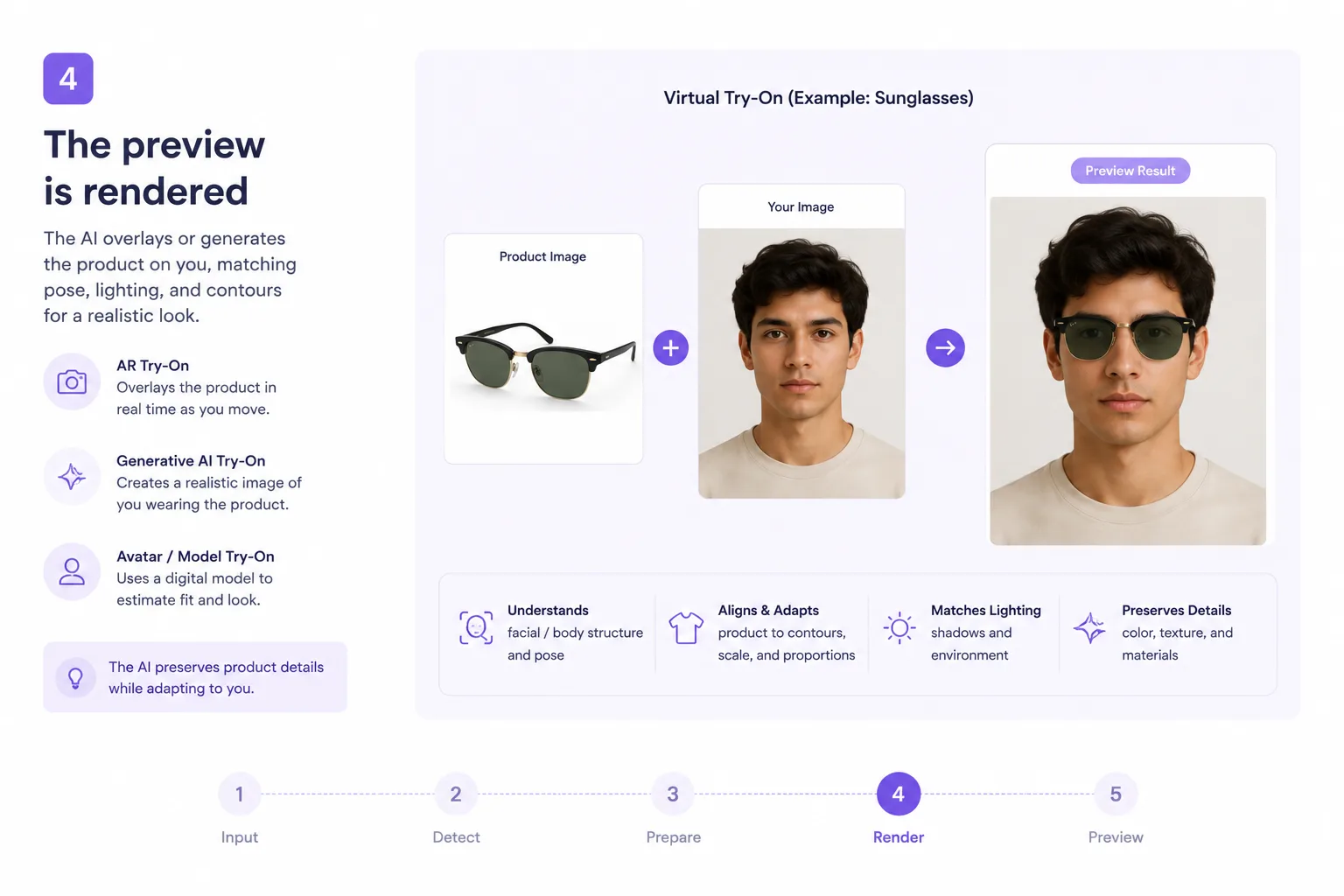
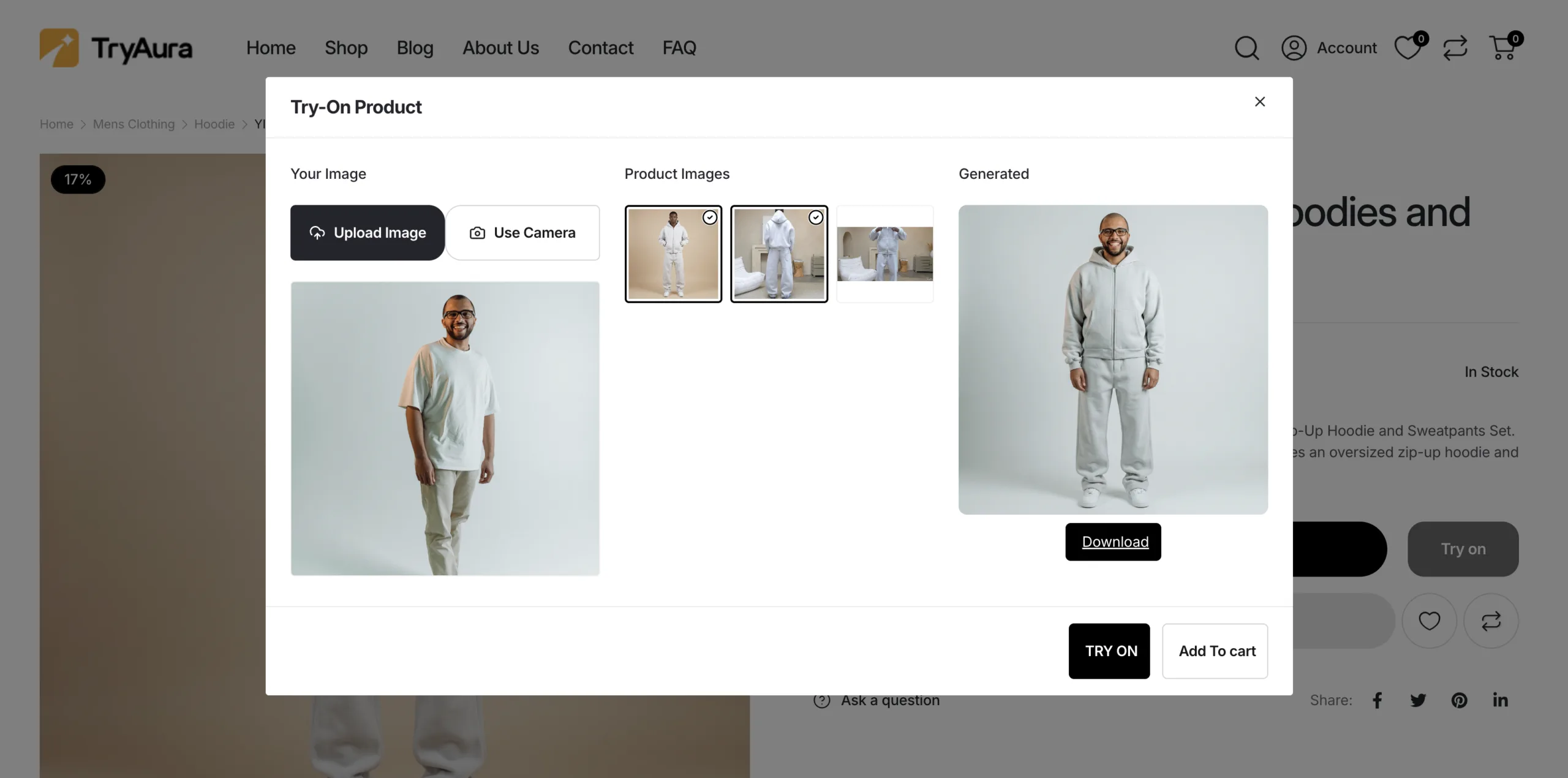
For generative AI try-on, the system creates a new image that shows the shopper wearing or using the product.
For avatar-based try-on, the system uses a digital body or measurement model to estimate fit and appearance.
Google’s work on generative AI virtual try-on is a good example of image-based try-on. Google explained that its diffusion approach used two images, one of a garment and one of a person, then passed each through neural networks that share information through cross-attention to generate a photorealistic result.
In 2025, Google also described a try-on experience where shoppers could upload a single image of themselves to virtually try apparel on their own body.
The big idea is simple. The AI is not just pasting a shirt on top of a person like a digital sticker. Good systems try to preserve the product details while adapting shape, pose, lighting, and body structure.
Step 5. The shopper gets a preview and decides
Finally, the shopper sees the try-on result on the product page, in the camera view, or inside a try-on panel.
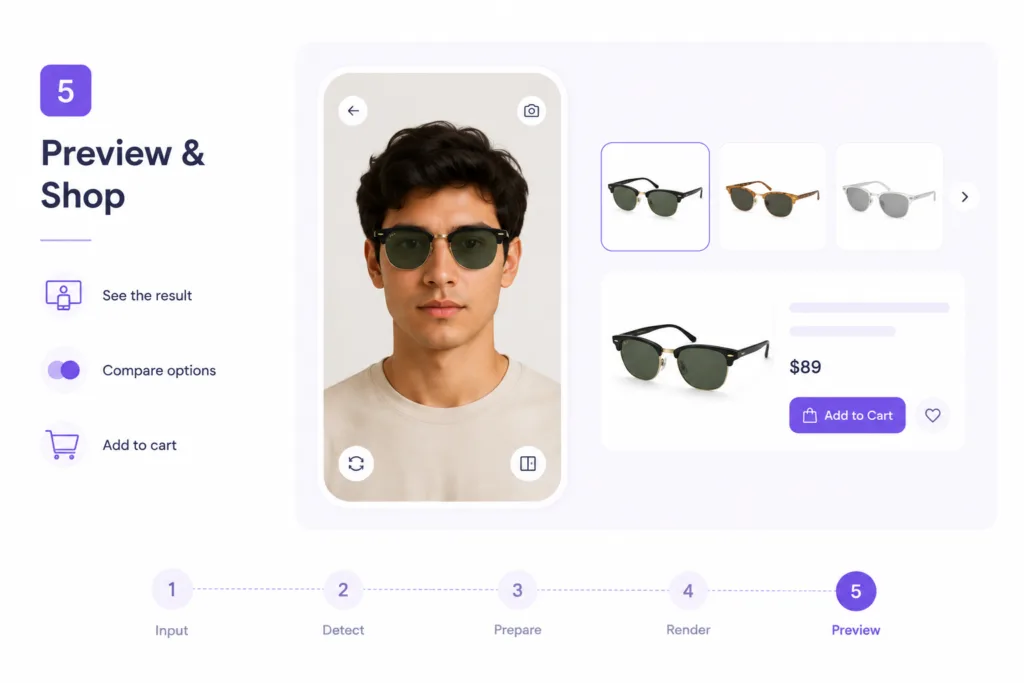
The best implementations keep the path short:
Try it on, compare options, add to cart.
For eCommerce, that low-friction path matters because every extra step creates a chance for the shopper to leave.
AR Try-On vs AI Try-On vs Avatar Try-On
Not every virtual try-on technology works the same way. This is where many store owners get confused, mostly because vendors use the phrase “virtual try-on” for everything from live AR mirrors to AI-generated fashion images.
Here is the practical difference.
| Type of virtual try-on | How it works | Best for | Main strength | Main limitation |
|---|---|---|---|---|
| AR try-on | Places a digital product over a live camera feed | Glasses, watches, jewelry, hats, makeup, accessories | Fast, interactive, feels like a mirror | Needs accurate tracking and product alignment |
| Generative AI try-on | Creates a new image of the shopper wearing or using the product | Clothing, fashion, accessories, product-in-hand visuals | Can show realistic fabric, pose, and context | Usually creates still images, not a live mirror |
| Avatar or size-based try-on | Uses measurements or a digital body model | Apparel, footwear, size-sensitive categories | Better for fit guidance when measurements are accurate | Requires body data and careful privacy handling |
| Model-based try-on | Shows product on selected models with different sizes or body types | Fashion brands with diverse model libraries | Useful when shopper upload is not available | Less personal than trying it on yourself |
For eCommerce, the best choice depends on what you sell.
If you sell glasses, AR is often the natural fit. If you sell apparel, generative AI may show fabric and styling more convincingly. If you sell luxury clothing where size accuracy matters, a size-based or avatar system may be valuable. If you sell beauty products, AR makeup previews can help shoppers compare shades quickly.
The mistake is choosing the flashiest technology instead of the right one for the product.
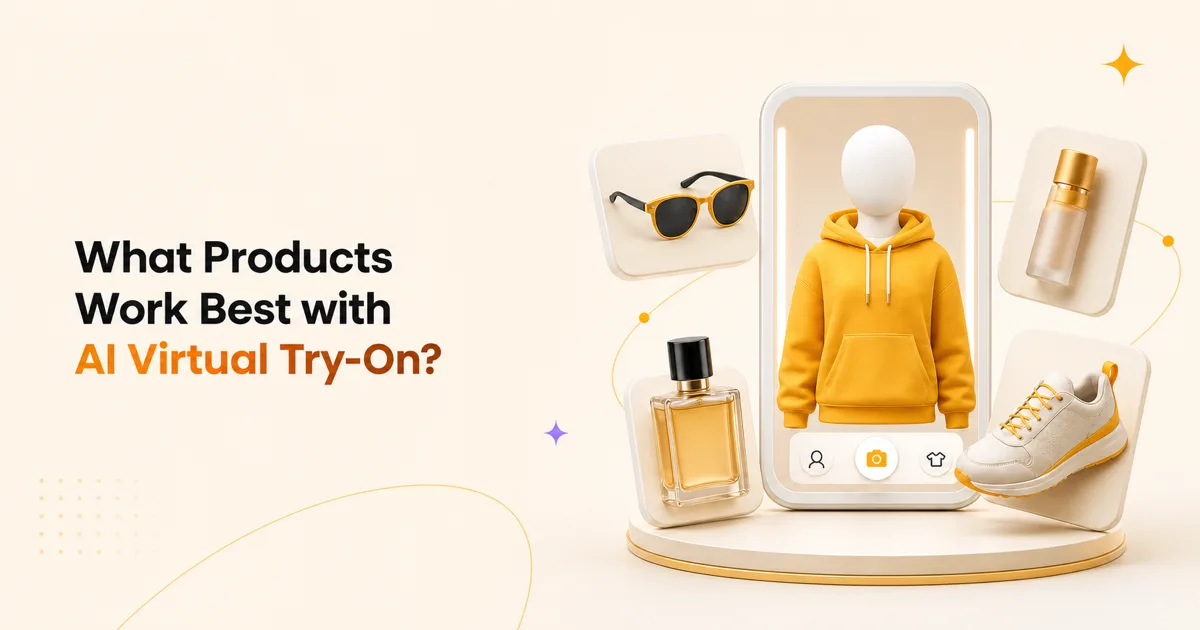
What Products Work Best with AI Virtual Try-On?
AI Virtual Try-On works best when appearance, fit, scale, or personal style drives the purchase decision.
Clothing and Fashion
Clothing is the category most people think of first. It is also one of the hardest.
A good fashion try-on tool needs to understand body shape, pose, garment structure, sleeves, collars, hems, folds, texture, and shadows. That is why the best virtual try-on app for fashion usually needs more than a basic AR overlay.
For tops, dresses, jackets, pants, and outfits, generative AI can be useful because it can create a new image that shows how the garment may appear on a person. This is especially helpful when shoppers want to judge style, silhouette, color, and overall look.
The honest caveat is that visual try-on is not the same as physical fit. A generated image can show whether a dress style suits someone, but it may not perfectly predict whether the waist will feel tight after lunch. Real life remains annoyingly three-dimensional.
Eyewear and Sunglasses
Eyewear is one of the strongest AR try-on use cases because glasses have a fixed shape and sit on predictable facial landmarks.
A shopper can turn on the camera, move their head, and compare frames quickly. This helps with face shape, frame width, lens size, color, and overall style.
For eyewear brands, the goal is not only to entertain. It helps customers narrow options faster and feel less unsure before ordering.
Jewelry and Watches
Virtual try-on for a jewelry online store can help shoppers understand scale and styling.
A necklace may look delicate in a close-up product image but disappear on a real neckline. A ring may look elegant on a white background but too bold on the shopper’s hand. A watch may seem minimal until it covers half the wrist.
Jewelry try-on usually depends on accurate placement and realistic rendering. Shine, metal color, stone detail, and scale matter. If the preview looks fake, the product may feel fake too. That is not ideal when you are trying to sell something premium.
Accessories
Virtual try-on for accessories eCommerce can cover hats, scarves, bags, headphones, watches, glasses, belts, and more.
Accessories are often about proportion. A bag may look compact in a catalog image but oversized on a petite shopper. A hat may look stylish on one face shape and deeply questionable on another. A try-on preview gives the shopper more confidence before purchase.
Beauty Products
Virtual try-on for beauty products is especially useful for shade-based decisions.
Lipstick, blush, eyeshadow, foundation, hair color, and nail polish all look different depending on lighting, skin tone, undertone, and surrounding colors. A beauty try-on tool helps the shopper compare options without applying twelve shades in a physical store and leaving with a hand that looks like a paint chart.
For beauty brands, try-on can also encourage exploration. Shoppers may test bolder colors when there is no mess, no commitment, and no awkward mirror moment under store lighting.
Products Held In Hand
Some AI try-on systems also support product-in-hand previews. This can help with cosmetics, gadgets, bottles, lifestyle goods, and small accessories.
The shopper is not exactly “wearing” the product, but they are seeing it in a real human context. That can help with scale, lifestyle presentation, and product appeal.
Does Virtual Try-On Reduce Returns?
Virtual try-on can reduce avoidable returns when the return is caused by uncertainty, poor visualization, wrong style expectations, or fit confusion. It is not a guaranteed return-reduction button.
The strongest logic is simple:
- Shoppers return items when reality does not match expectation.
- Virtual try-on helps shoppers build a more realistic expectation before buying.
- Better expectations can lead to more confident purchases and fewer surprises.
This is especially relevant in apparel, footwear, beauty, eyewear, and accessories. Coresight Research noted that apparel and footwear are more likely to be returned in online shopping partly because it is hard to visualize how items will look or fit.
Still, be careful with overexcited claims. You will see vendors promise dramatic return reductions. Some stores may get strong results. Others may see smaller improvements.
The outcome depends on your category, product quality, size consistency, return policy, photography, pricing, audience, and how many shoppers actually use the try-on feature.
A practical way to think about it:
| Return reason | Can virtual try-on help? | Why |
|---|---|---|
| “It did not suit me” | Yes | Preview helps with style and personal appearance |
| “The color looked different” | Sometimes | Better previews help, but screen and lighting differences remain |
| “The size was wrong” | Sometimes | Helps when paired with measurements or size guidance |
| “The product quality was poor” | No | Try-on cannot fix product quality |
| “I ordered multiple sizes on purpose” | Sometimes | Better confidence may reduce bracketing behavior |
| “It arrived damaged” | No | That is a fulfillment and packaging issue |
So, does virtual try-on reduce returns? It can, especially in categories where returns come from visual mismatch. But the most honest answer is “yes, when implemented with good product data, realistic previews, clear sizing, and proper expectations.”
How Accurate is AI Virtual Try-On?
AI Virtual Try-On accuracy depends on the product category, the input photo, the model quality, and what you mean by “accurate.”
For glasses, watches, rings, and some accessories, accuracy can be strong because the product has a stable shape and predictable placement.
For clothing, accuracy is more complex. AI can generate a convincing visual preview, but clothing involves fabric physics, body movement, size tension, drape, wrinkles, layering, lighting, and posture. That is a lot for any system to solve perfectly.
Modern diffusion-based virtual try-on research has improved realism, texture preservation, and garment alignment. At the same time, research surveys still point to challenges such as artifacts, occlusion handling, and accurate garment-body interaction in practical settings.
This leads to an important distinction.
AI Virtual Try-On is very useful for visual confidence. It is not always a perfect fit guarantee.
A shopper can use it to answer:
- Does this style suit me?
- Does this color work with my look?
- Is this accessory too big or too small visually?
- Does this product feel premium in context?
- Can I imagine myself wearing this?
A shopper should not rely on visual try-on alone to answer:
- Will this exact size fit my waist?
- Will the sleeve length be perfect?
- Will this fabric stretch enough?
- Will the shoe feel comfortable after walking?
For apparel, the best experience combines virtual try-on with size charts, fit notes, model measurements, customer reviews, and clear return policies. The AI helps with confidence. The sizing information helps with precision.
Does Virtual Try-On Actually Work For Clothes?
Yes, virtual try-on can work for clothes, but it is important to set the right expectation.
For apparel, AI virtual try-on is best used as a visual preview. It can help shoppers understand how a garment may look on a person, how the color might appear, and how the overall style may feel before they buy.
What it cannot do perfectly yet is guarantee exact fit.
Clothing is more complex than products like glasses, rings, or lipstick. Fabric changes based on material, cut, size, stretch, stitching, posture, and body shape. A loose cotton shirt, fitted top, blazer, hoodie, saree, and evening dress all behave differently.
That is why apparel try-on should not replace your size chart, fit notes, product measurements, or honest product descriptions.
The best approach is to use AI virtual try-on as a confidence builder. It helps shoppers see the style more clearly, compare products more easily, and feel more comfortable before making a decision.
For store owners, that can mean fewer hesitant shoppers, better product understanding, and a smoother buying experience.
Browser-Based Virtual Try-On Without App Download
One of the most useful improvements in virtual try-on software for eCommerce is browser-based access.
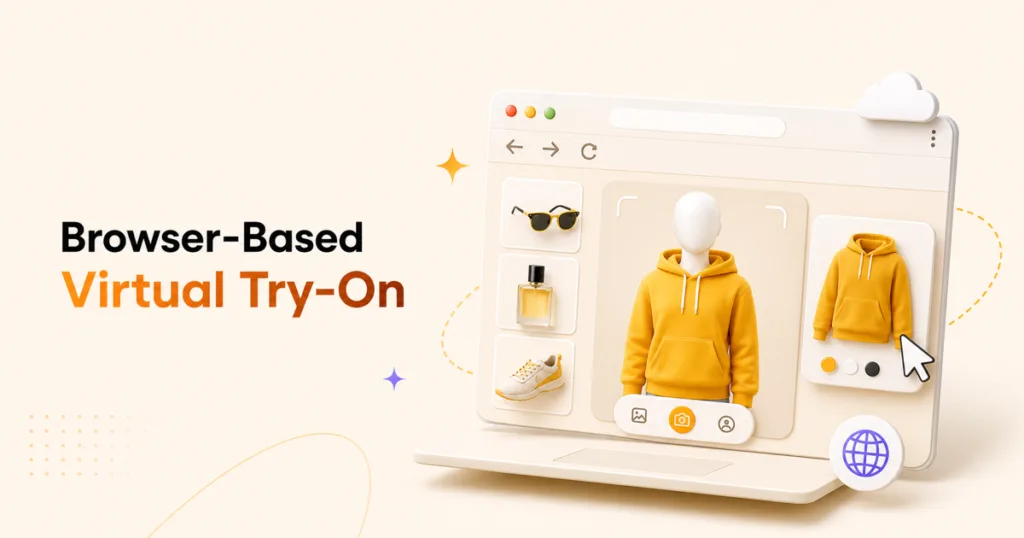
A browser-based virtual try-on for eCommerce lets the shopper use the feature from the product page without downloading a separate app. The experience may use the phone camera, image upload, or web-based AI generation.
That matters because app downloads create friction.
A shopper may happily tap “try on.” They may not happily leave your product page, go to the App Store, download an app, wait for installation, create an account, return to the product, and remember what they were buying in the first place. By then, the emotional purchase moment has packed its bag and left.
A virtual try-on without app download is usually better for conversion because it keeps the shopper inside the buying flow.
For store owners, the key questions are:
- Does it work on mobile browsers?
- Does it support iOS and Android?
- Does it require camera permission every time?
- Can shoppers upload a photo if they do not want to use the camera?
- Does the result appear directly on the product page?
- Can the shopper add to cart from the try-on experience?
The smoother the path, the more likely customers are to use it.
What To Look For In Virtual Try-On Software for eCommerce?
The best virtual try-on software for eCommerce is not always the tool with the loudest demo video. Choose based on fit for your store, your products, and your shoppers.
1. Category fit
Start with your product type.
Fashion stores need strong garment rendering. Jewelry stores need realistic scale and shine. Beauty stores need shade accuracy. Eyewear stores need face tracking. Accessory stores need placement and proportion.
A tool built for lipstick may not be the best tool for jackets. A tool built for glasses may not understand a flowing dress. Category fit comes first.
2. Realistic results
The result should look believable, not plastic, warped, blurry, or suspiciously “AI smooth.”
Test your real product images. Do not judge a tool only by its perfect demo assets. Demo assets are like dating profile photos. Useful, but not always the full truth.
Check:
- Product shape.
- Edges and alignment.
- Color preservation.
- Fabric or material detail.
- Body and face consistency.
- Lighting realism.
- Whether the output looks trustworthy.
3. Mobile experience
Most shoppers will use virtual try-on from a phone. Test it on real devices, not only on desktop.
Look for:
- Fast loading.
- Clear camera permission flow.
- Simple instructions.
- No app download.
- Good performance on Safari and Chrome.
- Easy return to product page.
4. Privacy controls
Virtual try-on often involves faces, bodies, hands, or uploaded photos. That makes privacy important.
A good tool should clearly explain:
- Whether customer photos are stored.
- Where processing happens.
- Whether images are used for training.
- How long files are retained.
- Whether shoppers can use upload instead of live camera.
- What consent is required.
Google’s own try-on surface labels generative AI as experimental and notes that it can make mistakes, which is a useful reminder that brands should set clear expectations around AI-generated previews.
5. Store integration
The tool should work where your business already works.
For Shopify, that may mean a Shopify app. For WooCommerce, that usually means a WordPress plugin that works inside WooCommerce product pages.
If you use WooCommerce, a tool like TryAura is built specifically for WooCommerce. It adds AI product visuals, product videos, and customer-facing virtual try-on inside the store workflow, so merchants do not have to move products between multiple tools.
6. Pricing model
Pricing matters more than many store owners expect.
Some virtual try-on tools charge by usage, credits, renders, products, monthly views, or enterprise seats. That can work, but it can also make costs hard to predict.
A bring-your-own-key model is different. With TryAura, merchants connect their own Google Gemini API key and control AI usage and cost through their own Google account. TryAura’s site describes this as a way to create without per-image charges from TryAura while paying the AI provider directly through the merchant’s own account.
This model is useful for WooCommerce merchants who want predictable plugin pricing and control over AI usage, instead of buying expiring credit packs.

Where TryAura fits in the AI Virtual Try-On conversation
TryAura is not trying to be a giant enterprise fitting-room platform with a five-month onboarding process and a PDF proposal that could be used as gym equipment.
TryAura is built for WooCommerce store owners who want to improve product visuals and add virtual try-on without leaving WordPress.
With TryAura, merchants can:
- Generate AI product images from existing WooCommerce product photos.
- Create product videos for product pages and campaigns.
- Enable virtual try-on so shoppers can preview products before buying.
- Use a bring-your-own Gemini API key model.
- Save generated assets inside the WordPress Media Library.
- Control where virtual try-on appears across products.
This makes TryAura a practical option for small stores, growing WooCommerce brands, marketplace operators, and agencies that want to add AI-powered product visualization without custom development.
The takeaway is simple. You do not need to start with an enterprise virtual fitting room. You can start by adding try-on to a few products where visual confidence matters most.
That may be your best-selling dress, your most returned accessory, your highest-margin jewelry item, or the product that customers keep asking about before buying.
Start small. Measure usage. Compare conversion and return patterns. Then expand.
How to add AI Virtual Try-On To An Online Store
If you are planning to add virtual try-on to your store, use this simple rollout plan.
Step 1. Choose the right product category first
Do not roll it out to the entire catalog on day one.
Start with products where visual confidence matters most:
- High-return items.
- High-margin products.
- Products with frequent pre-sale questions.
- Products where size, style, color, or scale is hard to judge.
- Products that already get good traffic.
This gives you the best chance of seeing meaningful results.
Step 2. Prepare clean product images
AI try-on works better when the product image is clear.
Use images with:
- Good lighting.
- Minimal clutter.
- Sharp product edges.
- Accurate color.
- Clear front or usable angle.
- No heavy watermarks.
You do not always need studio-perfect assets, but “clear enough for the AI to understand” is a good rule.
Step 3. Set expectations on the product page
Tell shoppers what the feature does and does not do.
Good microcopy could be:
Try it on virtually to preview the style before you buy. Results are AI-generated and may vary by photo, lighting, and device.
That kind of honest wording builds trust. It also protects you from shoppers treating the preview as a scientific measurement.
Step 4. Keep the experience close to the cart
The try-on feature should appear near the product image, size selector, or add-to-cart area.
Do not hide it in a tab nobody opens. If you add a confidence feature but bury it like treasure, shoppers will not use it.
Step 5. Measure what changes
Track before and after performance.
Look at:
- Try-on usage rate.
- Add-to-cart rate.
- Conversion rate.
- Return rate.
- Product questions.
- Time on product page.
- Revenue per visitor.
- Customer feedback.
Do not expect one week of data to prove everything. But over time, you should see whether shoppers are using the feature and whether it changes buying behavior.
Common Mistakes to Avoid
Before adding AI virtual try-on to your store, it helps to know where things can go wrong. Most mistakes are not technical. They usually come from using the feature in the wrong place, setting the wrong expectation, or adding too much friction.
- Using virtual try-on for products that do not need it: Not every product needs a try-on experience. A phone cable, for example, does not need a virtual fitting room. It needs clear photos, length, compatibility, reviews, and a product description that answers the obvious questions.Use virtual try-on where personal visualization matters, such as clothing, glasses, jewelry, beauty products, watches, bags, and accessories.
- Treating AI try-on as a size guarantee: For clothing, virtual try-on is best used as a visual confidence tool. It can help shoppers understand the style, color, and overall look, but it should not replace accurate size charts, fit notes, and product measurements.
- Using poor product images: AI can only work with the input you give it. If the product photo is dark, blurry, cropped badly, or shot from an awkward angle, the final try-on preview may look less realistic.Clean product images, clear angles, and accurate colors usually lead to better results.
- Ignoring shopper privacy: If shoppers upload a photo or use their camera, explain what happens to that image. Do not hide the answer deep inside legal text that sounds like it was written for seven lawyers and one very tired robot.Keep the privacy message clear, simple, and easy to find.
- Making shoppers download an app: For most eCommerce stores, browser-based virtual try-on is the better starting point. It lets shoppers try products directly on the product page without installing anything.The fewer steps between interest and preview, the better.
- Launching without measuring results: Virtual try-on is not something you add and forget. Track how many shoppers use it, which products get the most try-on activity, whether add-to-cart rates improve, and whether returns change over time.Treat it like any other conversion feature. Launch, measure, learn, and improve.
AI Virtual Try-On Checklist for Store Owners
Use this before choosing a virtual try-on solution.
- Does the tool match my product category?
- Does it work on mobile?
- Can customers use it without downloading an app?
- Does it support camera and photo upload options?
- Are the results realistic on my own product images?
- Does it explain privacy clearly?
- Can I control which products use try-on?
- Does it work with my eCommerce platform?
- Is pricing predictable as usage grows?
- Can shoppers add to cart after trying the product?
- Can I measure try-on usage and performance?
FAQs about AI Virtual Try-On
What is AI Virtual Try-On?
AI Virtual Try-On is technology that lets online shoppers preview a product on themselves using artificial intelligence, augmented reality, computer vision, or image generation. It is commonly used for fashion, eyewear, jewelry, watches, accessories, and beauty products.
How does Virtual Try-On work?
Virtual try-on works by capturing a shopper input such as a camera view or uploaded photo, detecting body or face landmarks, analyzing the product image or model, then rendering a preview. AR systems overlay a digital product on a live view, while generative AI systems create a new image of the shopper wearing or using the product.
Does Virtual Try-On reduce returns?
Virtual try-on can reduce returns when returns are caused by poor visualization, style mismatch, size uncertainty, or wrong expectations. It is not a complete fix for returns caused by product quality, shipping damage, inaccurate descriptions, or inconsistent sizing.
How accurate is Virtual Try-On AI?
Virtual try-on AI can be very useful for visual confidence, especially for accessories, eyewear, beauty, and many fashion previews. For clothing, accuracy depends on product images, body pose, fabric type, lighting, and whether the tool supports size or fit data. It should be treated as a preview, not a perfect measurement tool.
Does Virtual Try-On actually work for clothes?
Yes, virtual try-on can work for clothes when the goal is to help shoppers preview style, color, silhouette, and general appearance. It is less reliable as a standalone size predictor, so apparel stores should combine try-on with size charts, fit notes, reviews, and measurements.
What is the best Virtual Try-On app for fashion?
The best virtual try-on app for fashion depends on your platform, catalog, budget, and accuracy needs. For fashion, look for strong generative AI rendering, mobile support, realistic fabric handling, privacy controls, and integration with your eCommerce platform. WooCommerce stores should prioritize tools built directly for WooCommerce to avoid complex setup.
Can customers use Virtual Try-On without app download?
Yes. Many modern tools support browser-based virtual try-on for eCommerce, so shoppers can use a camera or upload a photo directly from the product page. This is usually better for conversion because customers do not have to leave the store to download an app.
What products are best for Virtual Try-On?
The best products for virtual try-on are visually driven products where personal appearance matters. This includes clothing, eyewear, watches, rings, jewelry, hats, accessories, makeup, hair color, beauty products, and products that shoppers may want to see in hand or on a model.
Is Virtual Try-On safe for customer photos?
It depends on the tool. Store owners should choose software that clearly explains whether customer photos are stored, how they are processed, whether they are used for AI training, and how shoppers can give consent. Privacy information should be visible near the try-on experience.
Is AI Virtual Try-On only for large brands?
No. AI Virtual Try-On is becoming more accessible for smaller online stores, especially when tools work with existing product images and integrate directly with platforms like WooCommerce. A small store can start with a few high-impact products before expanding across the catalog.
The Takeaway
AI Virtual Try-On helps eCommerce stores answer the question product photos often leave unanswered.
Will this look right on me?
It uses AR, generative AI, computer vision, or avatar-based systems to show shoppers a more personal product preview. It is especially useful for fashion, accessories, jewelry, eyewear, watches, and beauty products. It can reduce hesitation, improve buying confidence, and help lower avoidable returns when shoppers use it to make better decisions.
The honest version is this. AI Virtual Try-On is not a magic mirror. It cannot fix poor products, broken sizing, bad photos, or unrealistic promises. But when it is used with clear product information, good visuals, privacy-friendly design, and a smooth product-page experience, it can make online shopping feel far less like guessing.
For WooCommerce stores, TryAura brings AI product images, product videos, and virtual try-on into the same workflow, powered by your own Gemini API key. Start with a few products where visual confidence matters most, watch how shoppers use it, and let the data decide where to expand next.
Category:
Tags: