By Shakhawat Ullah
17 Min Read
Improve Product Photos with AI: How Turn Ordinary Images into Studio-Quality Visuals
Your products may be great, but the first thing shoppers judge is the photo.
And sometimes, that is where good products lose their chance.
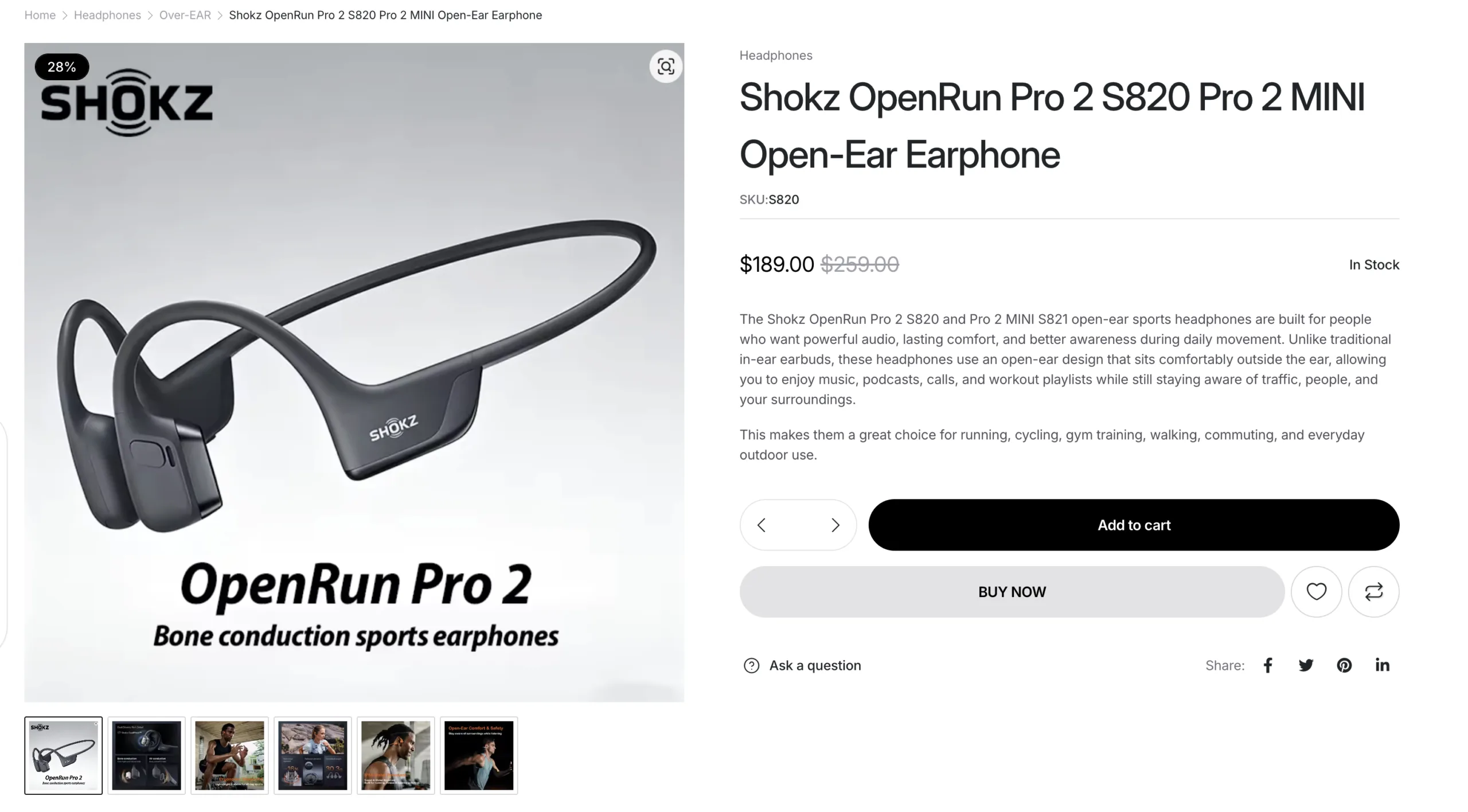
A supplier image with bad lighting. A cluttered background. A watermark in the corner. The same photo already used by ten other stores. Suddenly, the product you worked hard to source starts to feel ordinary.
A professional photoshoot can fix this, but it is not always practical. Studio setup, models, editing, and revisions take time and money, especially when you have multiple products to launch.
That is why more store owners are looking for ways to improve product photos with AI.
Instead of settling for weak supplier images, you can turn basic product photos into clean studio shots, model visuals, lifestyle images, and branded product photos that feel ready for your WooCommerce store.
In this guide, we will show you how to improve product photos with AI and create sharper, cleaner, more professional visuals without a traditional photoshoot.
Why Product Photos Matter More Than You Think
When a shopper lands on a product page, they are not only reading the title or checking the price. They are trying to decide if the product feels real, useful, trustworthy, and worth buying.
That matters because the product page is often the center of the buying decision, and Baymard’s product page UX research shows that unresolved product-page issues can cause shoppers to abandon otherwise suitable products.
Your product photos carry most of that weight.
A strong product photo can show texture, shape, color, size, fit, and quality in seconds. It helps shoppers imagine the product in their hands, on their body, in their room, or as part of their daily life.
A weak product photo does the opposite. It creates doubt and hesitation.
Is the color accurate? Is the fabric good? Does the shoe look premium? Will the jeans fit well? Is this store reliable?
That doubt can slow down the buying decision, especially for visual products like fashion, shoes, accessories, cosmetics, jewelry, home decor, and lifestyle items.
This is why improving product photos is not just about making your store look nicer. It is about making the buying decision easier.
Better photos help shoppers understand the product faster. They make your store feel more polished. They separate your brand from stores using the same supplier images. And they give customers more confidence before they click Add to Cart.
The Problem with Traditional Product Photography
For many WooCommerce store owners, better product photos sound simple until the actual work begins.
You need the product sample, right lighting, clean backgrounds, model, and even editing and retouching.
For one or two products, that may be manageable. But when you are launching a full catalog, testing new products, or updating seasonal collections, the process quickly becomes expensive and slow.
That is why many stores end up using whatever images they already have.
Supplier photos. Marketplace images. Cropped screenshots. Basic phone photos. Product shots that show the item, but do not sell it.
The result is a store that technically has product images, but not product visuals that build confidence.
And that is the gap AI product photography can help close.
How AI Helps You Improve Product Photos Faster
AI product photography gives store owners a faster way to improve product photos without rebuilding the entire visual production process from scratch.
Instead of starting with a studio, a photographer, and a full editing workflow, you can start with the image you already have.
- A basic shoe photo can become a clean studio shot.
- A flat clothing image can become an on-model fashion photo.
- A plain product image can become a lifestyle visual.
- A simple catalog photo can become a branded asset for your product page, ads, emails, and social posts.
The goal is not to create random AI art. It is to make your actual product look clearer, sharper, more trustworthy, and more aligned with your brand.
Good AI product photography should preserve the product, the shape, color, texture, logo, stitching, material, and key details should still feel accurate. The background, lighting, model, setting, and presentation can improve, but the product itself should remain believable.
When done right, AI helps you move faster without giving up control over your product presentation.
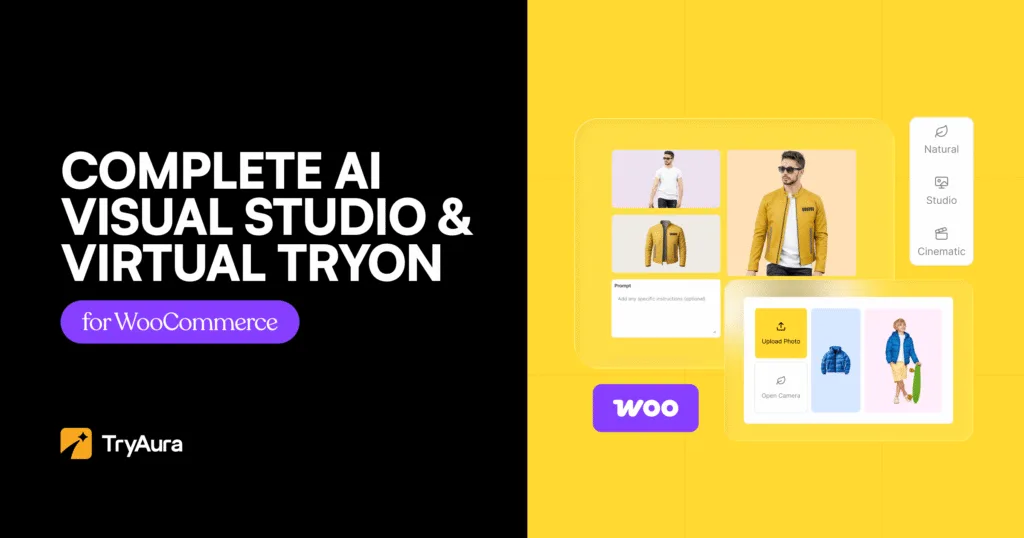
How TryAura Helps To Improve Product Photos with AI
TryAura is an AI visual studio built for WooCommerce. It helps you improve product photos with AI directly inside your store, without switching between multiple design tools, downloading files, editing somewhere else, and uploading everything back into WordPress.
You can open a product image, click Enhance with AI, choose a style, add a prompt, generate a new visual, and save the result to your WooCommerce product gallery.
That means you can turn ordinary product images into cleaner, more professional visuals right where your product pages already live.
With TryAura, you can create:
- Studio-quality product shots
- Lifestyle product photos
- On-model fashion images
- Product-in-hand visuals
- Product videos from images
- Virtual try-on experiences for shoppers
For a WooCommerce store, that matters because product visuals are not separate from the selling process. They are part of the product page, the gallery, the catalog, the campaign, and the shopper’s buying decision.
TryAura brings that workflow into one place.
How to Improve Product Photos with TryAura
Once TryAura is connected to your WooCommerce store, improving product photos becomes part of your normal product editing workflow.
You do not need to export images, open a separate design tool, generate visuals somewhere else, then upload everything back into WordPress.
You can work directly from your product images.
Start with a product that needs better visuals. It could be a supplier photo, a flat product image, or a basic catalog shot.
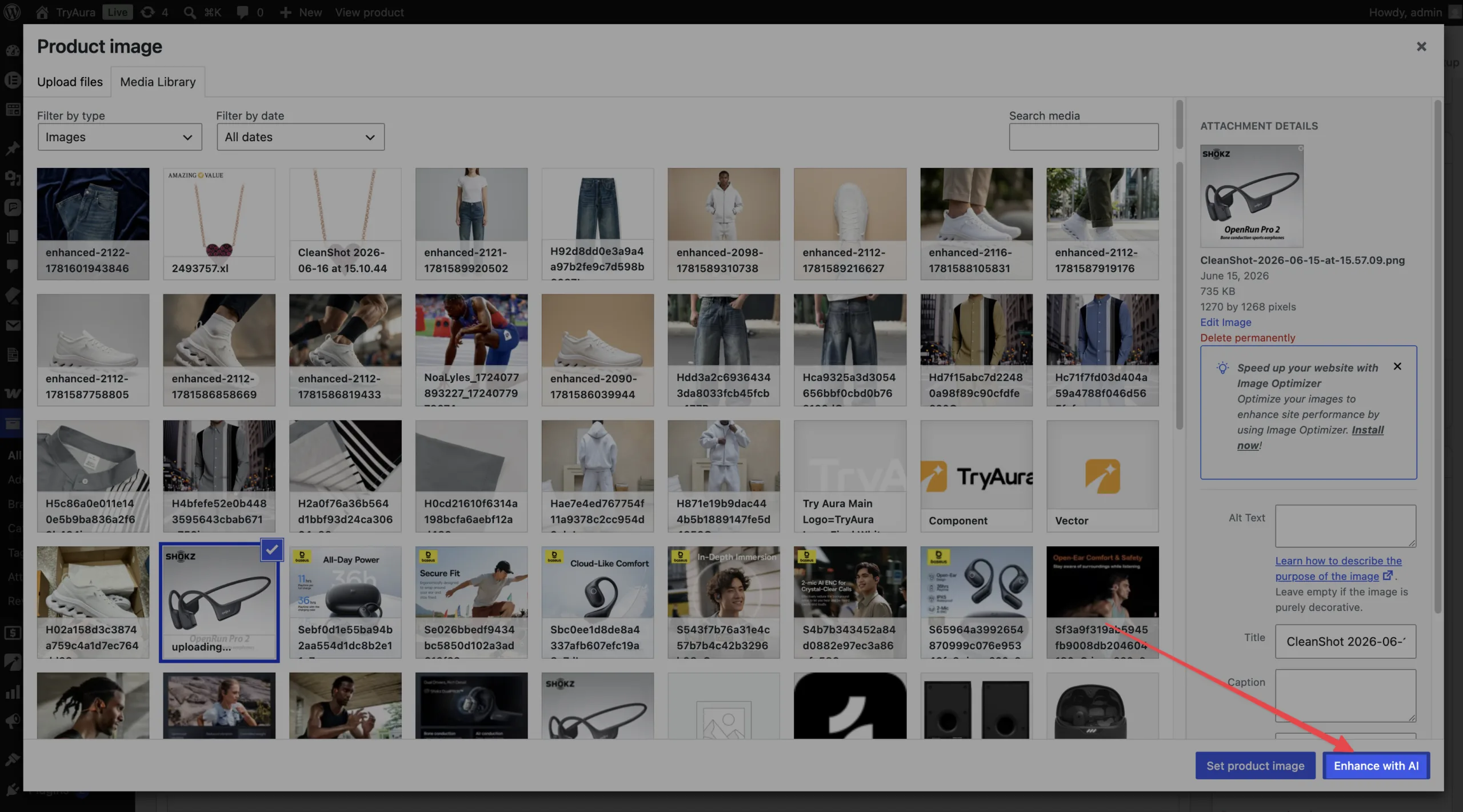
Open the product editor, click on the image, click Enhance with AI, choose your preferred style, add a clear prompt, and generate a new version.
Then review the result and save the best image to your product gallery. WooCommerce already gives store owners a dedicated product image and gallery workflow, so improved visuals can become part of the same product page experience shoppers already expect.
Let’s walk through a few examples.
Example 1: Turn a Supplier Sneaker Photo into a Clean Studio Shot
Supplier images are often the first place store owners get stuck.
The product itself may look good, but the image does not. The background may be messy, the lighting may feel flat, or the photo may look exactly like every other store selling the same item.
With TryAura, you can start with that same supplier image and turn it into a cleaner, sharper product shot for your WooCommerce store.
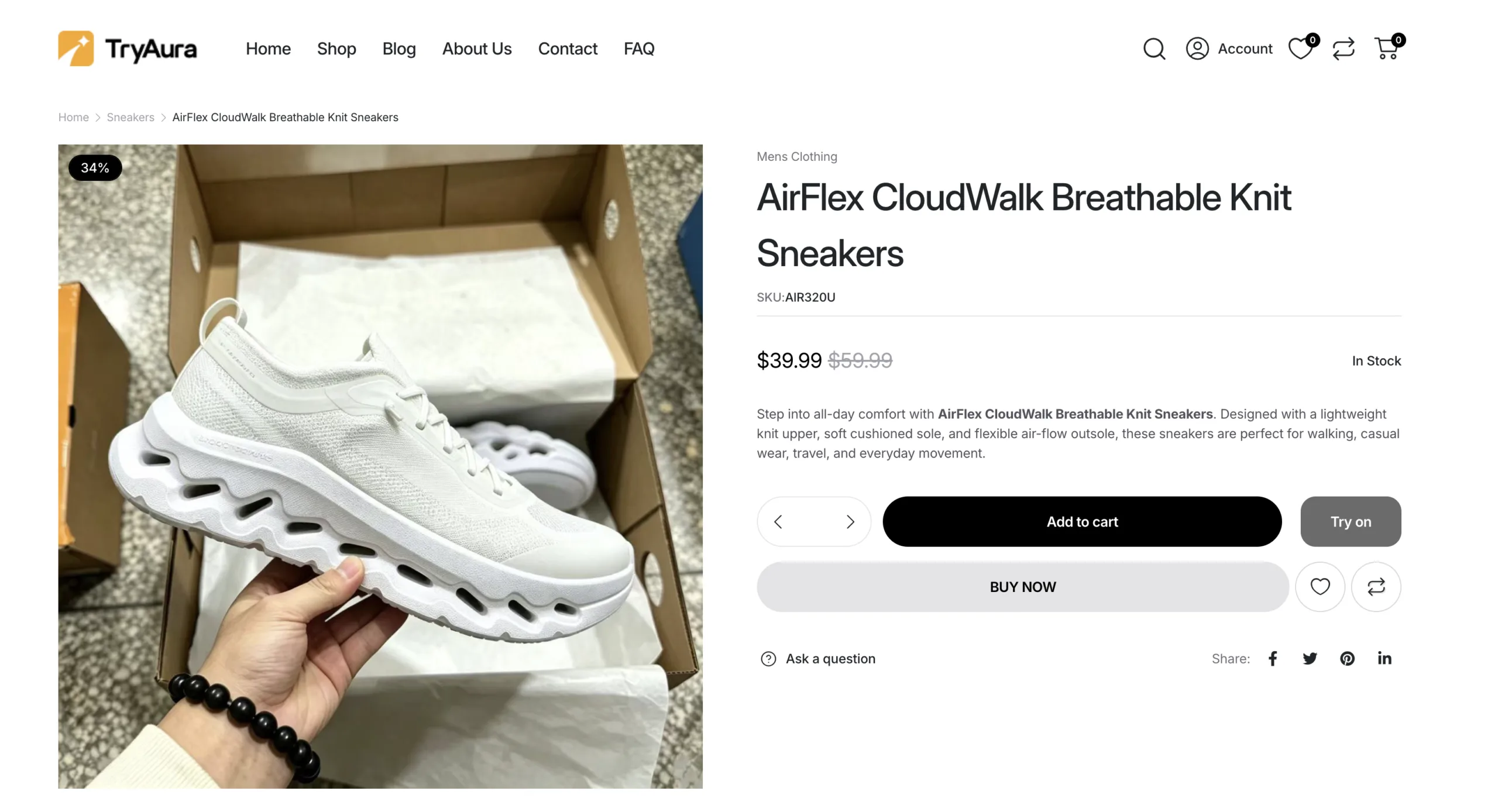
As you can see, the image on the AirFlex sneaker looks weak – it’s unprofessional and would need a photoshoot. Let’s have a look into how you can create a high quality product photo in 2 minutes.
Open the sneaker image inside your product editor and click Enhance with AI. Choose a studio-style background, select a realistic photo style, and describe the result you want.
Instead of a generic supplier photo, you now have a cleaner product visual that feels more polished and ready for your store.
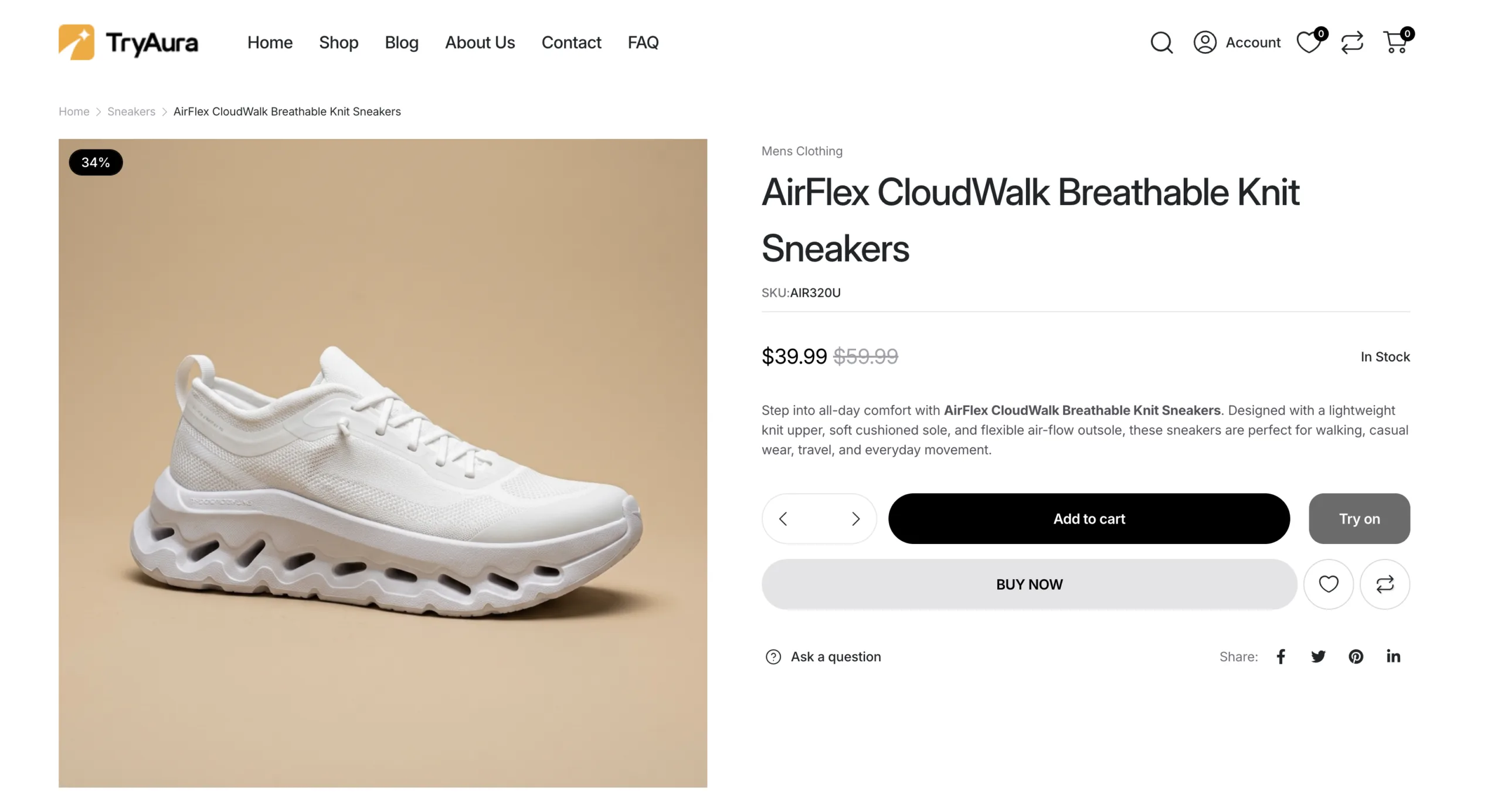
Looks cleaner, right? This type of image works well as a main product photo because it keeps the focus on the product. The background does not compete for attention. The lighting feels intentional. The product looks easier to trust.
Example 2: Put the Sneaker on an Athlete
A clean studio shot is great for showing the product clearly.
But sometimes shoppers need more context.
For a sneaker, they may want to imagine how it looks when worn. They may want to understand the style, fit, shape, and energy of the product in a more realistic setting.
With TryAura, you can create an on-model product photo using your sneaker image and a model reference.
Select the sneaker image, choose a model image, click Enhance with AI, and describe the scene you want.
Now the sneaker is no longer just floating on a plain background. It is shown in use. The shopper can better understand how it looks on a person, how it might fit into their lifestyle, and why it feels worth buying.
This type of image works well in the product gallery, homepage sections, social media posts, ads, and campaign banners.
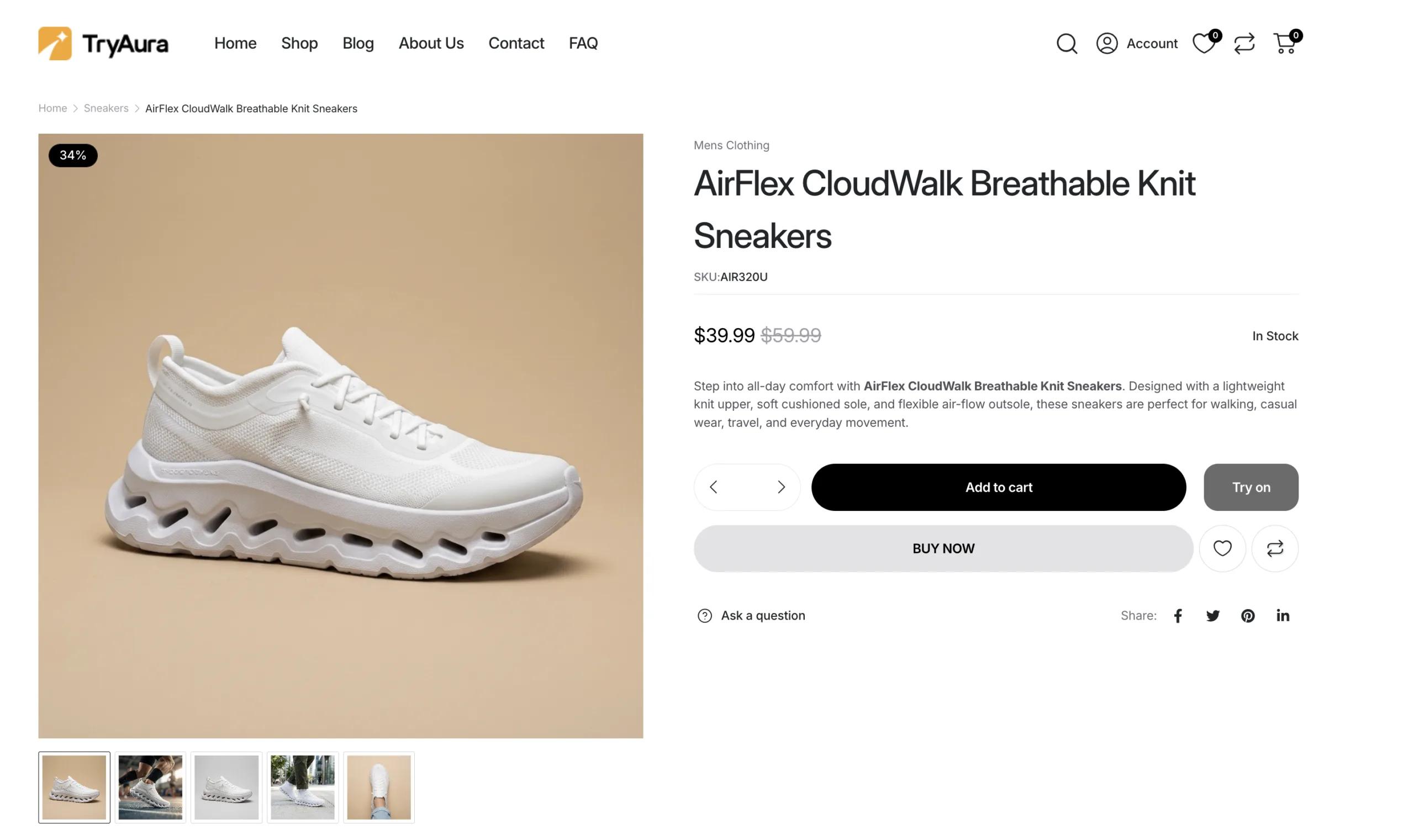
As you can see from the image above, the product page looks clean, and the customers who want to see the shoe in a better light can easily visualize it.
It gives the product a story without requiring a full photoshoot.
Example 3: Turn Flat Jeans into a Model Photo
Apparel products often need more than a flat image.
A pair of jeans on a plain background can show the shape, but it does not always show the fit, fall, fabric, or style. Shoppers want to know how the product might look when worn.
That is where AI model photos can help.
Start with the flat jeans image. Click Enhance with AI, choose a realistic fashion style, and write a prompt that focuses on product accuracy.
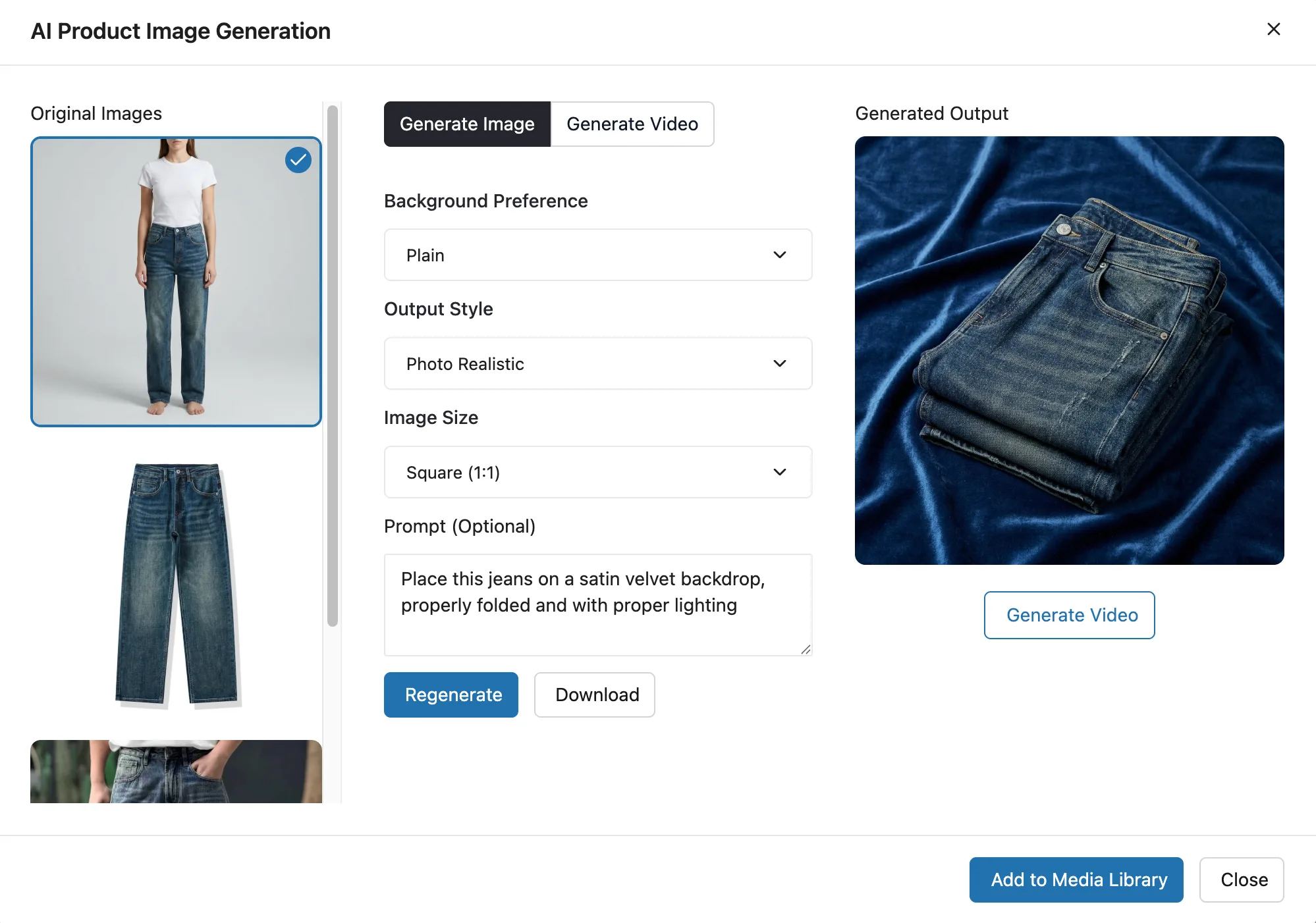
For clothing, accuracy matters. The AI-generated image should not change the product into a different style. The denim color, pocket shape, fit, stitching, and waistline should still match the product you are selling.
When the result is accurate, save it to your WooCommerce product gallery.
Now the product feels more complete. Instead of showing only a flat pair of jeans, your page can show how the jeans look on a model, how the fabric sits, and how the product might feel in real life.
That small shift can make the product page feel much more convincing.
Go Beyond Photos with Product Videos
Better product photos can make your store look more professional.
But sometimes, a still image is not enough.
A short product video can help shoppers understand the product faster. It can show the shape, material, texture, movement, and overall feel in a way a single image cannot.
For fashion products, this could mean showing how the fabric moves. For shoes, it could mean a slow cinematic camera movement around the product. For jewelry, it could mean highlighting shine, reflection, and detail. For bags, cosmetics, or accessories, it could mean turning a simple product image into a more premium visual asset.
With TryAura, you can create product videos from your product images inside WooCommerce.
You can use these videos in your product gallery, homepage sections, social media posts, ads, email campaigns, and launch content.
This is especially useful when you do not have the time or budget for a full video shoot. Instead of planning a studio session, filming the product, editing clips, and exporting multiple versions, you can create simple product videos from the visuals you already have.
The goal is not to replace every type of product video.
But for many WooCommerce stores, AI product videos can be a faster way to make product pages feel more dynamic, polished, and convincing.
Let Shoppers Try Products Before They Buy
Once your product photos look better, the next step is shopper confidence.
Because even with great images, some customers still wonder:
Will this look good on me? Will the style match what I want? Can I imagine myself using this product? Is this the right choice?
That hesitation is especially common with products like shoes, clothing, accessories, watches, jewelry, eyewear, bags, and beauty items.
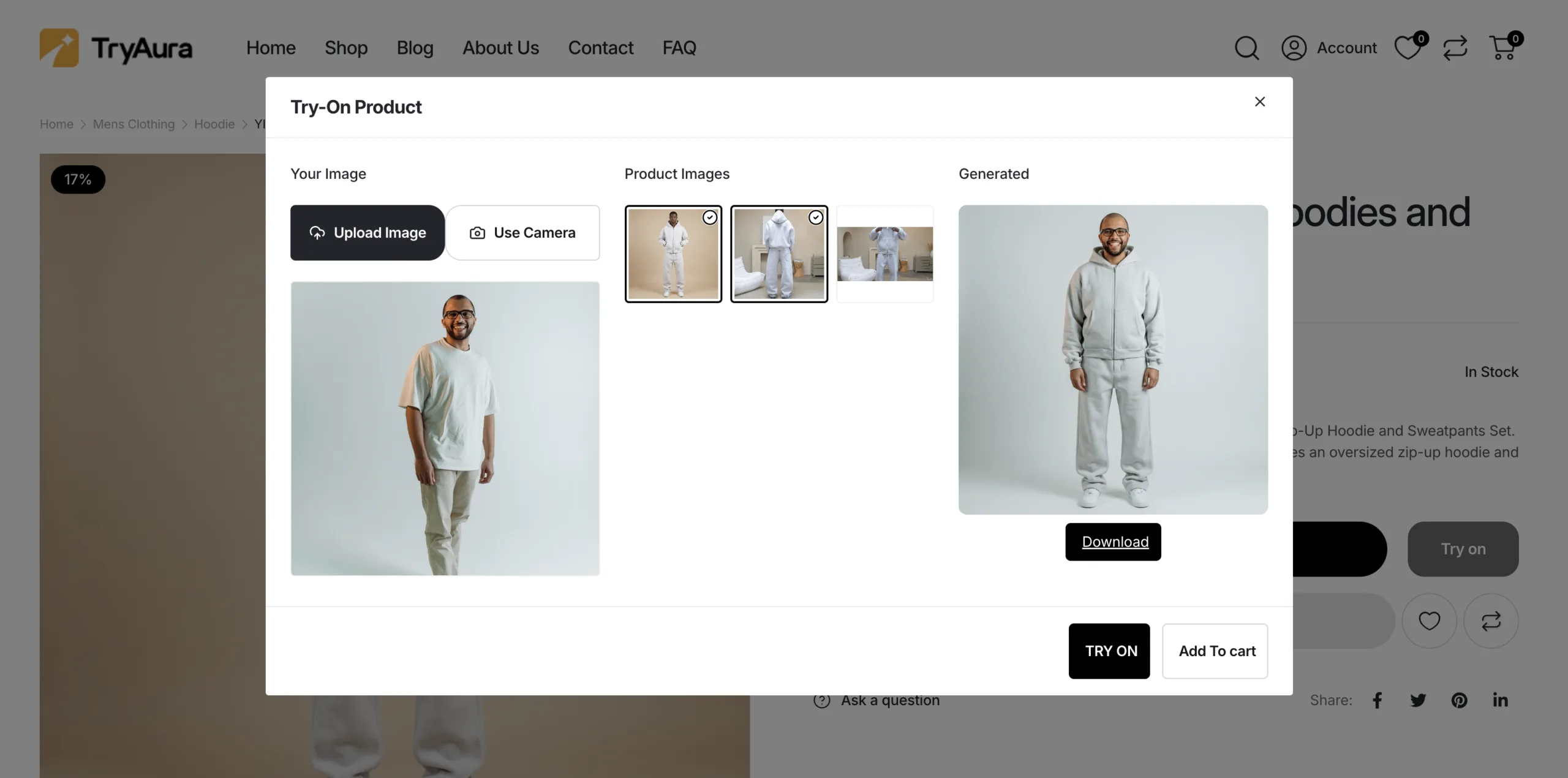
TryAura helps you reduce that doubt with virtual try-on.
Instead of only looking at a product photo, the customer can connect the product to themselves. That makes the decision feel more personal and more confident.
For store owners, this is powerful because product visuals no longer stop at the gallery. They become part of the buying experience.
Together, AI product photos, product videos, and virtual try-on give your WooCommerce store a stronger visual experience from start to finish. You can improve how products look, show them in motion, and help shoppers picture the product on themselves before they buy.
How to Write Better Prompts for AI Product Photos
AI can improve product photos, but the result depends heavily on the instruction you give it.
A vague prompt may create a nice image, but not always the right image. For product photography, the goal is not just to make something beautiful. The goal is to make the product look better while keeping it accurate.
A good prompt should clearly explain five things:
- What the product is
- What kind of photo you want
- What background or setting should be used
- What style or lighting should guide the result
- What product details must stay unchanged
Here is a simple formula you can use:
Create a [type of product photo] of this [product] in a [background or setting]. Use [lighting/style]. Keep the original [color, shape, material, logo, texture, and key details] accurate.
For example: Create a premium studio product photo of this sneaker on a clean minimal background. Use soft professional lighting and realistic shadows. Keep the original shoe color, shape, sole, logo, stitching, and material details accurate.
For clothing, your prompt should focus on fit and fabric:
Create a realistic fashion product photo of these jeans worn by a model. Keep the original denim color, stitching, pockets, waistline, fit, and fabric texture accurate. Use a clean studio background and soft editorial lighting.
For lifestyle images, describe the environment:
Show this skincare product on a clean bathroom counter with soft morning light, a premium minimal background, and realistic reflections. Keep the bottle shape, label, color, and cap details unchanged.
For product videos, keep the motion simple:
Create a short cinematic product video with a slow camera movement around the product. Use realistic studio lighting, soft shadows, and a premium ecommerce look. Keep the product design and details unchanged.
The more specific you are about what should change and what should stay the same, the more useful your AI-generated product visuals will be.
Product Photo Ideas You Can Create with TryAura
Once you understand the workflow, you can use TryAura for more than one type of product image.
Here are a few ideas you can try:
| Product Type | Photo Ideas |
|---|---|
| Shoes | Studio shot, athlete wearing the shoe, close-up sole detail, sports lifestyle scene |
| Jeans and apparel | On-model studio photo, streetwear look, folded studio shot, fabric close-up |
| Jewelry | Close-up model shot, premium studio lighting, hand-worn detail, gift-style visual |
| Cosmetics | Product-in-hand image, bathroom counter scene, flat lay, clean studio shot |
| Bags | Model holding the bag, lifestyle street scene, studio product shot, detail close-up |
| Home decor | Styled room scene, close-up texture shot, lifestyle interior visual |
You do not need to use every style for every product.
For most stores, a strong product gallery should include a mix of clear and contextual images:
- A clean main product image
- A close-up detail shot
- A lifestyle or model image
- A use-case image
- A short product video when helpful
- A virtual try-on option for suitable products
This gives shoppers more ways to understand the product before they buy.
Quality Checklist Before You Publish AI Product Photos
AI can make product visuals look better, but you should still review every image before publishing it.
Before adding an AI-generated image to your product page, check:
- Does the product shape match the original?
- Is the color accurate?
- Are logos, labels, or text distorted?
- Does the material look believable?
- Are important details like stitching, pockets, soles, buttons, or caps correct?
- Does the lighting look natural?
- Are there any strange shadows or extra objects?
- Does the model pose look realistic?
- Does the image represent the product honestly?
- Does the visual match your brand style?
This step matters.
Your product photo should improve presentation, not mislead the shopper. If the AI output looks beautiful but changes the product too much, generate a new version with a more specific prompt.
A simple rule is this:
If the image makes the product look better while still showing the real product accurately, it is worth using.
If it makes the product look like something else, do not publish it.
Where to Use Your Improved Product Photos
Once you create better product visuals, you can use them across more than just the product gallery.
You can use them on:
- Product pages
- Category pages
- Homepage sections
- Landing pages
- Email campaigns
- Social media posts
- Paid ads
- Blog banners
- Product launch graphics
- Video thumbnails
This is one of the biggest advantages of improving product photos with AI.
You are not only fixing one image. You are creating a stronger visual library for your entire store.
How Much Does It Cost to Improve Product Photos with AI?
Traditional product photography can become expensive quickly, especially when you need models, studio time, editing, and multiple product variations.
AI product photography gives you a more flexible way to create visuals.
With TryAura, you connect your own Google Gemini API key and pay Google directly for AI usage. You can check Google’s Gemini API pricing to understand the current model costs before generating images or videos. That means you are not locked into buying image credits from the plugin every time you want to improve a product photo.
For many store owners, this makes the workflow easier to control. You can test different visuals, improve more products, and create new assets when needed without planning a full photoshoot every time.
You still need to review the final output carefully. But compared to arranging a traditional shoot for every product, AI gives you a faster and more affordable way to upgrade your product presentation.
Frequently Asked Questions
Can I improve product photos with AI if I only have supplier images?
Yes. TryAura can improve supplier images, but clearer source photos usually create better results.
Do I need a professional photoshoot before using TryAura?
No. You can start with basic product images, supplier photos, or simple catalog shots.
Can TryAura create product photos with models?
Yes. TryAura can create on-model visuals for products like clothing, shoes, accessories, jewelry, bags, and similar items.
Can I create product videos with TryAura?
Yes. TryAura can create product videos from product images, helping you show motion, texture, and product appeal without a video shoot.
Will AI change the actual product details?
It can if the prompt is too vague. Always review the final image and check color, shape, logo, material, and other key details.
Can shoppers try products on themselves?
Yes. TryAura supports virtual try-on, so shoppers can preview suitable products on themselves before buying.
Is TryAura only for fashion products?
No. It works well for fashion, shoes, accessories, cosmetics, jewelry, home decor, fitness products, gifts, and many visual product categories.
Where are the generated images saved?
You can save generated visuals to your WooCommerce product gallery and use them across your store.
Does TryAura charge per image?
TryAura uses your own Google Gemini API key, so you pay Google directly for AI usage instead of buying image credits from the plugin.
Final Thoughts
Your products deserve better than ordinary supplier photos.
Because in ecommerce, shoppers do not only judge the product. They judge how clearly, confidently, and professionally you present it.
It is not just about making images look better. It is about helping your WooCommerce store feel more polished, more useful, and more ready to convert.
With TryAura, you can start with the product images you already have and turn them into better visuals directly inside WooCommerce.
No traditional photoshoot, complicated editing workflows or switching between multiple tools.
Just better product photos, videos, and try-on experiences for the products you already believe in.
Start improving your product photos with AI today using TryAura.
Category:
Tags: