By Shakhawat Ullah
21 Min Read
How to Create Product Videos From Photos Without a Video Shoot
You have product photos. You have descriptions. Somewhere between landing on your page and clicking Add to Cart, shoppers are still hesitating.
Most of the time, it comes down to one thing: they cannot see the product move. A still image shows one angle, one moment. It cannot show how fabric drapes, how a bag sits when carried, or how a texture looks in real life. That unanswered question is what sends shoppers to a competitor who has answered it with video.
Product video closes that gap. Research shows that product pages with video see 37% more add-to-cart conversions than image-only page.
The problem for most WooCommerce stores has never been whether video works. It is the cost.
A single traditional product video can run $1,000 to $50,000 to produce, before editing. For a store with 50 products, that math does not add up.
AI product video generation changes that. You can now turn any existing product photo into a short, realistic video in under five minutes, with no camera and no editing software.
In this guide, you will learn:
- Why product videos increase conversion rates and why most WooCommerce stores skip them
- What AI product video generation is and what it can realistically produce
- How to create product videos from photos, step by step
- What to expect by product type: fashion, accessories, jewelry, and beauty
- How to add product videos to your WooCommerce store
- Which options are free and when a paid plan makes sense
Let’s get started.
Why Product Videos Matter (and Why Most WooCommerce Stores Skip Them)
Product videos move shoppers closer to buying. Product pages with video see 37% more add-to-cart conversions than pages without them, according to Invesp.
A separate study by Tubular Labs found that 73% of consumers say they are more likely to buy after watching a video that explains how a product works.
The reason is straightforward: a shopper cannot hold the product, feel the fabric, or see how it moves. A still image gives them one frame of reference. A video gives them the next best thing to being in the store.
So why don’t more WooCommerce stores have product video?
The answer is almost always cost. Traditional product video production starts at roughly $1,000 per video for a basic freelancer setup and can reach $50,000 or more for a studio shoot.
For a store with 50 products, that is a $50,000 floor before a single video goes live.
Along with that comes the logistics, including booking talent, coordinating props, editing footage, and exporting the right formats. Most WooCommerce store owners run small teams with limited time. A video production cycle is not something they can schedule around.
The mobile picture makes this gap more costly. Seventy-five percent of video consumption now happens on mobile devices, according to Insivia. WooCommerce shoppers are already on their phones when they browse. Product video that shows movement, texture, or scale is the format they are primed to watch.
The result is a clear pattern: stores that add product video give shoppers more to work with before clicking Add to Cart. Stores without it rely on photography alone.
That gap is now closable without a shoot. If you want to understand why product photography still plays a role alongside video, the product photography for eCommerce guide covers what to get right at the image level first.
What Is AI Product Video Generation?
AI product video generation is the process of converting a still product image into a short video clip using an AI model.
The AI reads your image and generates a sequence of frames that add natural motion: fabric texture rippling, a product rotating slowly, or a camera moving gently around an object.
No filming happens at any point – the video is built entirely from the image you provide.
The technology runs on large video diffusion models, the same class of AI behind tools like Google Veo, Runway Gen, and Kling. You provide an image, a style prompt, a camera motion direction, and an aspect ratio. The model returns a finished video clip, typically in 8 seconds to 30 seconds.
The output is a short product clip, typically 3 to 8 seconds long. That is the right length for most product page uses: a looping visual in the product gallery, a clip in a Meta or TikTok ad, or an asset that shows the product in motion before a shopper decides to buy.
Three Types of Motion Available Today
Three categories of movement are possible with current image-to-video AI:
- Texture and material animation: fabric drapes, ripples, or stretches; leather catches light; knitwear shows its weave
- Camera motion: slow orbit, zoom in, pull back, or horizontal pan around the product
- Environment interaction: the product placed in a lifestyle setting with subtle background movement or light shift
Standalone Tools vs Integrated Workflows
There are two practical ways to access this workflow. The first is through standalone SaaS tools like Runway or Kling: upload a product image, generate the video, download it, then upload it to your store manually.
The second is through a plugin that runs the whole process inside WordPress, from generation to media library to product gallery, without switching platforms.
Which approach fits depends on your catalog size and how much file management you want to handle.
What AI product video generation does not replace is brand storytelling videos with actors, filmed unboxing content, or tutorial explainers that require a person on screen.
If your goal is a 60-second cinematic lookbook with a cast and crew, that is outside what image-to-video AI produces today.
If your source images need improvement before you generate from them, the AI product photography for WooCommerce guide covers what to get right at the image level first.
Product Video for eCommerce Without Equipment: What’s Actually Possible
You do not need a camera, lighting kit, or studio to create eCommerce product video. AI video generation works from a single still image and produces a downloadable clip in under five minutes.
What you get back depends on the image quality and product type, but for most catalog categories the output is ready to use on a product page the same day.
Here is how the two approaches compare across the dimensions that matter most to a store owner:
| Traditional Video Shoot | AI Video Generation | |
|---|---|---|
| Equipment required | Camera, lighting rig, backdrops, props | None – one product image |
| Time per product | Half day to full day (shoot + edit) | Under 5 minutes |
| Cost per video | $300–$1,500 (freelancer) to $50,000+ (studio) | Cents per clip at API rates |
| Consistency across 50 SKUs | 50 separate shoot sessions | Same style settings, one workflow |
| Editing required | Yes – cut, grade, export | No – AI delivers a finished file |
| Retakes or changes | Reschedule the shoot | Re-generate in under two minutes |
What AI Video handles well
The practical strength of AI video is catalog scale.
A 50-product store shooting traditional video at $500 per clip faces a $25,000 production floor before editing. The same catalog through AI video runs on API usage and an afternoon of generation time.
The output ceiling is short-form product motion: subtle movement that shows a product in context without overworking it. A leather bag catches light as the camera pans.
A dress fabric shifts to show drape. A skincare bottle rotates against a clean background. These are 3 to 8 second clips, not full-length films, and that is exactly what works on a product page or in a paid social ad.
What AI video does not handle yet
Fast action, hands-on product interaction, and demonstration content that requires a person using the product on camera are outside what current image-to-video tools do well. For those use cases, filming is still the right call.
One practical note on aspect ratio: most AI video tools output both 16:9 (landscape) and 9:16 (vertical) formats. Since 75% of video consumption happens on mobile devices, generating the vertical version at the same time as the landscape version costs nothing extra and prepares the asset for both product pages and social ads.
Authenticity vs Polish
Authenticity matters more than polish. Realistic movement that preserves the product’s actual texture and material detail performs better on product pages than heavily stylized outputs.
The goal is to help the shopper see the product clearly, not to produce a film.
How AI Product Video Generation Works (Step by Step)
Creating a product video from a still image follows the same five-step workflow across all AI video tools. AI-powered tools have cut video production time from days to under 30 minutes for equivalent content. Here is the full process.
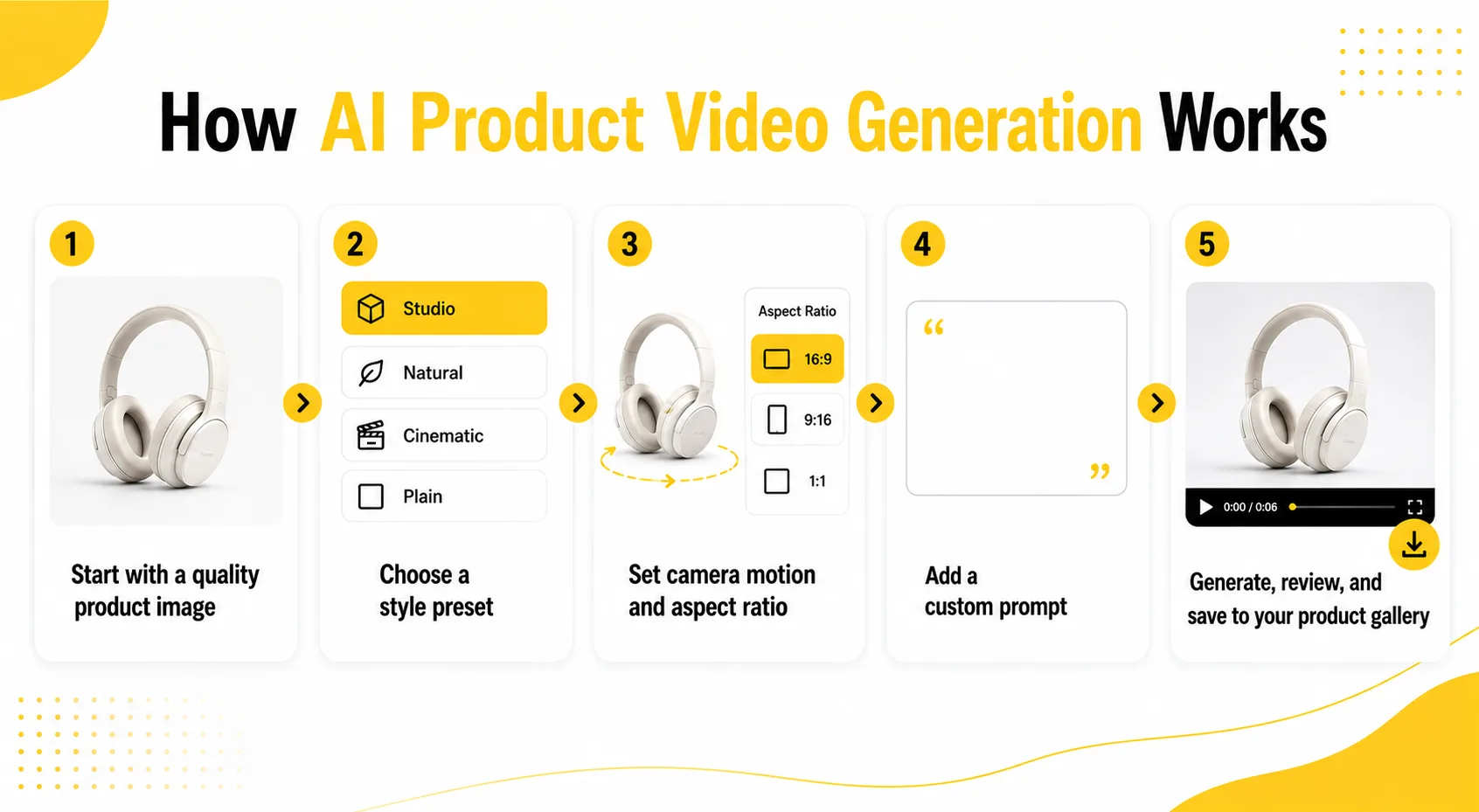
Step 1: Start with a Quality Product Image
Your source image is what the AI works from. It does not need to be extraordinary, but it should be clear, well-lit, and show the product fully in the frame. A plain or neutral background works well for most catalog products. Avoid blurry images, heavy drop shadows, or composite shots with multiple products.
The AI reads the image to understand the product’s texture, shape, and surface detail. A cleaner image produces a more accurate and consistent video.
Step 2: Choose a Style Preset
Most tools offer style options that control how the video looks:
- Studio: clean, bright, product against a neutral background – works for most catalog categories
- Natural: soft, organic lighting – good for lifestyle and handmade products
- Cinematic: moodier, more filmic – suited for fashion and premium brand aesthetics
- Plain: minimal treatment – fast output, good for testing before committing to a style
For a first run, Studio or Natural gets usable results without extra configuration.
Step 3: Set Camera Motion and Aspect Ratio
Camera motion controls how the virtual camera moves around the product. A slow orbit or gentle zoom works for most catalog items. It shows the product from multiple angles without competing with it for attention.
Set your aspect ratio at this step:
- 16:9 (landscape): standard for product page embeds and desktop
- 9:16 (vertical): required for mobile-first product pages and social ads
- 1:1 (square): useful for Instagram and some product gallery layouts
Generate both 16:9 and 9:16 in the same session. The additional generation costs the same and saves running the process again later.
Step 4: Add a Custom Prompt
A short text prompt adds context the model uses to improve the output. Examples that work: “white linen fabric moving gently in soft light,” “matte black perfume bottle with clean surface reflections,” “leather bag rotating slowly on a wooden surface.” A specific, product-accurate prompt consistently outperforms a blank prompt field.
Step 5: Generate, Review, and Save to your Product Gallery
Generate the clip. Review it: does the product look clear and natural? Is there visual distortion at the edges or unnatural warping? If the output needs adjustment, change the style or motion setting and regenerate – it takes under two minutes per attempt.
Download the file and upload it to your WooCommerce product gallery, or embed it using a Gutenberg video block directly on the product page.
For WooCommerce stores: TryAura runs this entire workflow inside the WordPress product editor. You generate from the product page, the video saves to your Media Library, and it goes into the product gallery without leaving WordPress.
Best Prompts for AI Product Video Generation
A good prompt can make the difference between a generic moving image and a product video that feels realistic, useful, and ready for your WooCommerce store.
With AI product video generation, your prompt should not try to do too much. The goal is to guide the AI on four things: product movement, camera motion, lighting, and background style. The more specific and product-accurate your prompt is, the better the final video usually looks.
A strong product video prompt follows this simple structure:
Product + motion + camera direction + lighting + background
For example:
“White linen dress moving gently in soft natural light, slow camera push-in, clean studio background, realistic fabric texture.”
Here are prompt examples you can use based on your product type.
Fashion and Apparel Prompts
Use prompts that focus on fabric movement, texture, and fit. Avoid asking for dramatic motion, because subtle movement usually looks more realistic.
Prompt 1:“Cotton t-shirt moving gently in soft studio light, subtle fabric folds, slow camera zoom, clean white background, realistic texture.”
Prompt 2:“Elegant dress with light fabric sway, natural daylight, slow cinematic camera movement, soft neutral background, realistic drape and stitching.”
Prompt 3:“Denim jacket rotating slowly, visible fabric texture and seams, clean studio lighting, minimal background, realistic product video.”
Bag and Accessories Prompts
For bags, belts, wallets, and leather products, focus on surface detail, stitching, and slow rotation.
Prompt 1:“Leather handbag rotating slowly on a clean studio surface, soft reflections, visible stitching, premium product video style.”
Prompt 2:“Minimal wallet with slow camera orbit, realistic leather grain, soft shadow, neutral background, high-end product video.”
Prompt 3:“Canvas tote bag moving gently in light air, natural lighting, soft fabric texture, clean lifestyle background.”
Jewelry Prompts
Jewelry needs clean prompts because small reflective products can distort easily. Keep the motion slow and controlled.
Prompt 1:“Gold ring rotating slowly on a clean reflective surface, soft studio lighting, realistic shine, close-up product video.”
Prompt 2:“Silver necklace with subtle camera push-in, clean white background, soft reflections, realistic metal texture.”
Prompt 3:“Diamond pendant in close-up view, gentle light movement, slow camera motion, premium jewelry product video.”
Beauty and Cosmetics Prompts
Beauty products work well with polished lighting, soft reflections, and clean surfaces.
Prompt 1:“Skincare bottle rotating slowly on a glossy surface, soft studio lighting, clean pastel background, premium cosmetic product video.”
Prompt 2:“Perfume bottle with subtle light reflections, slow cinematic camera push-in, elegant background, realistic glass texture.”
Prompt 3:“Lipstick product standing upright, slow camera orbit, soft beauty lighting, clean studio background, high-quality product video.”
Home and Lifestyle Product Prompts
For home goods, use prompts that highlight material, shape, and environment.
Prompt 1:“Ceramic mug on a wooden table, subtle camera push-in, warm natural light, realistic ceramic texture, cozy lifestyle product video.”
Prompt 2:“Handmade woven basket with slow camera movement, natural fibers visible, soft daylight, minimal home background.”
Prompt 3:“Wooden decor item rotating slowly, visible wood grain, soft shadow, neutral background, realistic product video.”
Prompt Tips for Better AI Product Videos
Keep the product accurate. Do not ask the AI to change the product color, shape, or material unless that is your goal.
Use simple motion. “Slow rotation,” “gentle zoom,” “subtle fabric movement,” and “soft light shift” usually work better than fast or dramatic action.
Mention the material. Words like cotton, leather, glass, ceramic, gold, denim, or matte plastic help the AI understand how the product should move and reflect light.
Avoid too many instructions. A long prompt with five different scenes, camera angles, and background changes can make the output unstable.
Generate more than one version. Even with a strong prompt, AI product video generation may need two or three attempts to get the cleanest result.
For most WooCommerce product pages, the best prompt is not the most creative one. It is the one that makes the product look clear, realistic, and easy to understand before the shopper clicks Add to Cart.
AI-Generated Product Video Examples: What to Expect by Product Type
Different product categories generate differently with AI video tools. Knowing what works well and where the limits are helps you get usable output on the first attempt rather than the third.
Fashion and Apparel
Fashion products are the strongest use case for image-to-video AI. Fabric texture, drape, and movement are what current video models handle best. A dress on a neutral background will generate a subtle sway or fold. A knit sweater will show the weave in motion.
The AI preserves stitching, textile patterns, and material surface detail across cotton, linen, jersey, knitwear, denim, and most woven fabrics.
Expect less consistent output for: sheer fabrics, very fine printed patterns, and highly reflective materials like sequins or metallic foils. For these, a plain orbit motion prompt with a simple background produces cleaner results than complex style prompts.
Neutral merchant research reports modest return rate reductions when shoppers can see fabric movement before buying, suggesting that even short product video reduces the “this looks different in person” return reason.
Accessories: Bags, Belts, and Leather Goods
Leather goods generate clean rotation and texture animation. The AI handles surface variation well: grain patterns, stitching detail, hardware reflection.
A slow orbital camera motion around a leather bag produces a strong result with minimal prompting.
For soft accessories like fabric totes or scarves, a motion prompt that includes gentle environmental movement (“fabric moving softly in light air”) outperforms a plain orbit prompt. The model needs context to animate soft materials realistically.
Jewelry
Jewelry is technically demanding. Small objects with fine detail and high reflectivity require a close, clean source image at high resolution to generate well.
A ring or pendant photographed against a plain background outperforms a lifestyle shot with a model. Gold and silver surface reflection generates consistently; gemstone facets and internal clarity are more variable and may need multiple generation attempts.
Beauty and Cosmetics
Skincare bottles, perfume flacons, and cosmetic packaging generate strong results because the products are geometric and high-contrast. A slow rotation against a neutral or gradient background is the standard output.
For liquid products like serums or facial oils, prompting for “product on a reflective surface with subtle wet-surface detail” adds realistic texture cues that match what the product actually looks like.
Home Goods and Lifestyle Products
Ceramic, wood, and woven textile products generate well. The AI handles natural material textures accurately: wood grain, ceramic glaze, handwoven fabric.
For smaller objects, a zoom-and-rotate motion works better than a wide orbit. For larger pieces like furniture, a static camera with a subtle light shift often produces cleaner output than camera movement.
One expectation to reset across all categories: AI product video does not generate a human model wearing or using the product. Current image-to-video tools animate the product itself.
For on-model product video, filming is still required. For a deeper look at how AI handles try-on specifically, the roundup of virtual try-on plugins for WooCommerce covers the options for on-body product preview.
How to Add Product Videos to Your WooCommerce Store
WooCommerce supports product videos in the product gallery without any additional plugin. The native gallery accepts both embedded video URLs and self-hosted video files uploaded to the WordPress Media Library.

Embed from YouTube or Vimeo
Upload your video to YouTube or Vimeo, copy the video URL, then open the WooCommerce product editor and add the URL in the Product Gallery section. WooCommerce renders the video as a gallery item alongside your product images.
This is the fastest setup and requires no extra server storage.
Upload a self-hosted MP4
If you prefer to keep video on your own server, for page speed control or to avoid third-party dependencies, upload the MP4 to the WordPress Media Library and add it to the product gallery the same way you add a product image. WooCommerce handles playback natively.
Keep AI-generated product clips under 2MB to avoid affecting page load time. A 3–8 second clip at 1080p in H.264 format typically exports between 2MB and 8MB.
Add via a Gutenberg video block
For product pages built with the WordPress block editor, add a Video block or Gallery block directly to the product page content area. This gives you more layout control outside the native gallery section and works well for embedding a video above the product description or in a dedicated media section.
Use a dedicated video gallery plugin
Several free plugins on WordPress.org add a dedicated video section with more display control: autoplay settings, thumbnail layout, multi-video support per product, and video-first gallery ordering. If your store features products where video is the primary sales asset.
A video gallery plugin adds the display flexibility that the native gallery does not offer by default.
Free AI Tools for Video Generation
Most standalone AI video tools have a free tier with one of three limits: a monthly generation cap, a watermark on all outputs, or restricted resolution.
Google AI Studio provides rate-limited access to Veo for testing and low-volume use at no charge. Runway offers a free tier with watermarked output. If you use Kling, you will get a generous amount of video generations before they charge you.
You can also use open source models like Seedance and host it in your local machine with a powerful GPU. Although this is not recommended, but you can create unlimited videos for free using AI.
Frequently Asked Questions
Do product videos increase conversion rate?
Yes. Product pages with video consistently see higher add-to-cart rates than image-only pages. Invesp reports 37% more add-to-cart conversions on pages with video, and Tubular Labs found that 73% of consumers say they are more likely to buy after watching a product explanation video. The lift varies by product category, with fashion, beauty, and accessories seeing the strongest impact from video that shows movement and texture.
How do I make a product video without a camera?
Use an AI image-to-video tool. Start with any existing product photo, upload it to an AI video tool, choose a style and camera motion, then generate. The output is a short video clip of your product in motion. No filming is required at any point. For WooCommerce stores, this workflow can run inside the WordPress product editor using a dedicated plugin, saving the export and re-upload step.
Can I create product videos from photos only?
Yes. Image-to-video AI tools generate short video clips from a single still product image. The AI adds movement – fabric texture animation, product rotation, or camera motion – to create the appearance of a filmed product. You do not need a video file, a filming setup, or editing software. One clear product photo is enough to start.
How much does it cost to create AI product videos?
Costs vary by tool and model. Credit-based tools like Bandy.ai charge $150 to $900 per 1,000 generations, and credits expire. Tools using a BYOK model pass generation costs directly to the AI provider at API rates, typically a few cents per clip. Plugin annual fees run $39 to $159 per year depending on site count. Traditional video production costs $300 to $50,000 per video, before editing.
What is the best WooCommerce plugin for product videos?
TryAura is the only WooCommerce plugin that generates product videos from existing product images inside the WordPress product editor. Generated videos save to the Media Library and go directly into the product gallery without leaving the admin. It uses Google Gemini via BYOK, so generation costs go to Google at API rates with no markup. Image generation is on the free plan; video generation starts at $39 per year.
How do I add a product video to WooCommerce?
Open the product editor and go to the Product Gallery section. Add a video by pasting a YouTube or Vimeo URL, uploading an MP4 from the Media Library, or using a video gallery plugin for expanded display options. WooCommerce renders video alongside product images natively. No custom code is required for basic video embedding.
Are AI product videos good enough for a real store?
Yes, for most catalog product types. AI product video accurately renders fabric texture, product rotation, surface material, and camera motion. The output is realistic enough for product pages and paid social ads. For most WooCommerce catalog products, the quality is sufficient to help shoppers understand the product before buying.
How long does it take to generate a product video with AI?
Most AI video tools return a 3–8 second product clip in 30 seconds to two minutes, depending on the tool and style settings. No rendering, editing, or exporting is required on your end. Generation time is consistent regardless of catalog size – a 50-product catalog can be processed in a single afternoon.
Conclusion
Product video is no longer a production budget line item. AI product video generation turns existing product photos into short, usable clips in minutes, with no equipment, no editing software, and no studio time.
The case for adding video to WooCommerce product pages is clear: higher add-to-cart rates, longer time-on-page, and fewer returns from shoppers who could not visualize the product. The barrier to getting there is now a workflow question, not a budget question.
Start with one product. Pick your best product image, run it through an AI video tool using the steps in this guide, and see the output. The full workflow takes under ten minutes on a first attempt.
If you want to run image generation, video generation, and virtual try-on inside WooCommerce without switching platforms, TryAura handles all three from a single plugin.
Category:
Tags: