Upsell Order Bump
Turn Checkout Into a Final Offer, Not a Bill
The checkout page is your most profitable sales tool. Add a one-click Order Bump offer to dramatically increase your average order value.
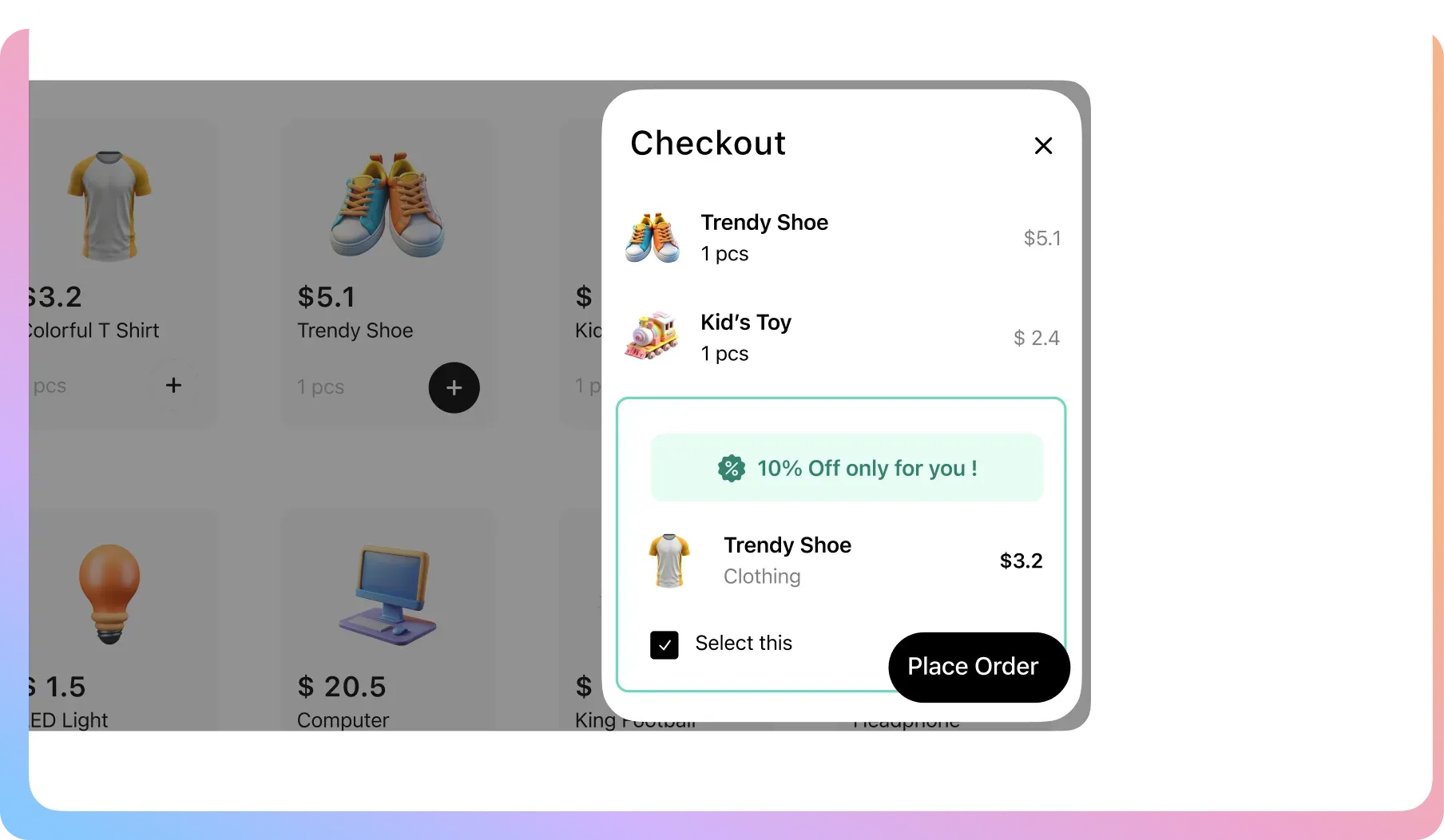
The Easiest Way to Increase Your Average Order Value
Get full control to create and display irresistible one-click offers right on your WooCommerce checkout page.
Campaign Management
Easily name and organize your order bump offers for clear tracking and performance analysis.
Offer Scheduling
Run your order bumps continuously or schedule them to be active only during specific sales periods.
Precision Targeting
Trigger an order bump when specific products or entire categories are in the customer’s cart.
Product Selection
Choose exactly which product you want to present as the one-click upsell offer on your checkout page.
Multiple Offer Types
Control the deal. Offer the bump for free, a flat discounted price, or as a percentage off.
Discount Value Display
The offer box automatically shows the original price crossed out, visually proving the value of your deal.
Brand Colors
Customize the offer box’s border, color, and margins to fit perfectly with your checkout page design.
Full Design Control
Adjust the background color, text color, and font size for every part of the offer to make it stand out.
You’re Closing the Sale, But
Forgetting to Ask for More
An order bump isn’t pushy; it’s smart. It’s a relevant suggestion at the one moment your customer is most receptive. Not using one is leaving money on the table with every single transaction.
You Are Ignoring Your Customer’s Peak Buying Moment
ProblemWhen a customer’s wallet is open, your checkout page is passive. You’re ignoring them when they trust you the most.
The FixOur Order Bump places a relevant offer on the checkout page. A simple checkbox to get an impulsive, profitable “yes.”

Traditional Upsells Feel Annoying and Aggressive
ProblemUnwanted popups and redirects before payment risk the entire sale. They can irritate a customer into abandoning their cart.
The FixOur Order Bump is seamless and not a popup. It’s a clean part of the checkout that improves the user experience.

You Think Small Add-ons Are Too Complicated to Set Up
ProblemYou have perfect impulse-buy items but setting up complex rules seems like too much work, so you miss out on revenue.
The FixWe make it simple. A few clicks can offer a relevant add-on to every order, creating a significant new revenue stream.

FAQ
Check out our frequently asked questions. Feel free to Contact us if your question isn’t listed
Where exactly does the order bump appear on the page?
It appears directly on your checkout page, typically positioned near the payment details or final summary section. It is designed to be seen right before the customer clicks the final “Place Order” button.
Does this interrupt the checkout process or send users to a new page?
Absolutely not. That’s the key. It is not a popup. The customer never leaves the checkout page. They simply tick a box, and the order total updates instantly. It is a completely frictionless experience.
Can I offer a different bump for different products?
Yes. You create rules that determine when a bump is shown. For example, you can set it so that when “Product A” is in the cart, “Bump A” is offered, and when “Product B” is in the cart, “Bump B” is offered.
Can I offer the bump product for a discount?
Yes. You have full control over the pricing. You can offer the bump product at its regular price, a specific flat discounted price (e.g., “$10 off”), or a percentage discount (e.g., “50% off”).
How are shipping costs handled when a customer adds an order bump?
It works seamlessly with your existing WooCommerce shipping rules. When a customer accepts the bump, the cart updates instantly. If the added product affects the order’s weight or price enough to change the shipping rate, your store’s shipping methods will recalculate automatically before payment.

Ready to Double Your Revenue with Checkout Upsells?
Join 10,000+ smart stores solving their biggest growth challenges. Get the results you want, risk-free for 14 days.