

What is FeedPulse?
FeedPulse is a Shopify app that puts your Instagram and TikTok posts on your store and turns them into a place people can shop.
What FeedPulse does
Section titled “What FeedPulse does”FeedPulse embeds your live Instagram and TikTok content directly on your storefront. You tag your Shopify products to individual posts, and shoppers can add those products to their cart from a popup without leaving your store.
Your customers see a familiar, scrollable gallery of your social posts. When they tap one, the product in that post is right there, ready to buy.
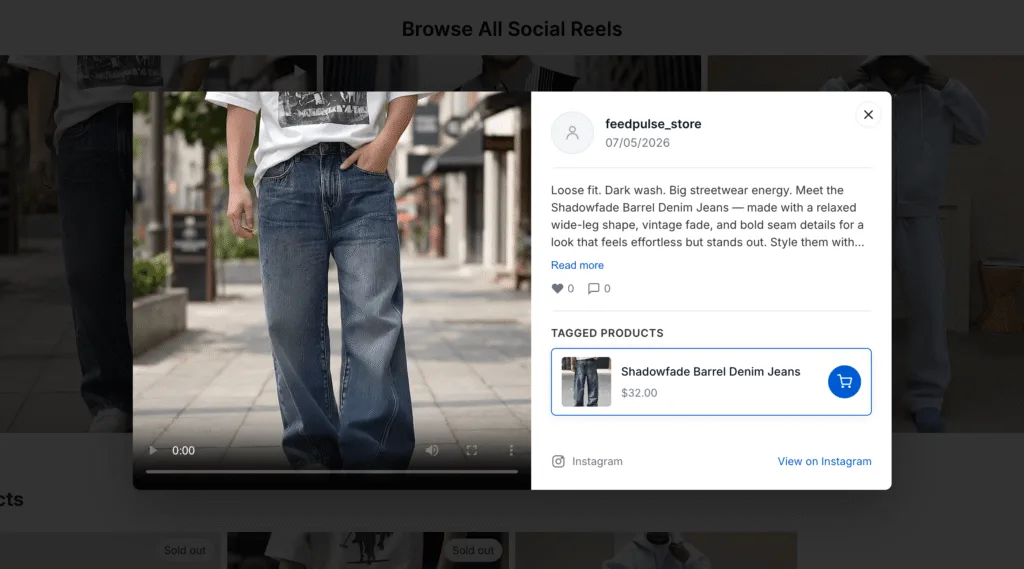
The problem it solves
Section titled “The problem it solves”You post on Instagram and TikTok to drive people to your store. The trouble is what happens after the click. The exact product they saw is no longer in front of them, so they have to search for it. Most never do.
Shopify has no built-in way to embed a live social feed or attach products to specific posts. And without that link, you can’t tell which posts actually lead to sales.
FeedPulse closes that gap. Your social content becomes a shoppable part of your store, and you can see how it performs.
How it works, start to finish
Section titled “How it works, start to finish”Setting up FeedPulse takes four steps:
- Connect an Instagram or TikTok account.
- Create a feed from that account and choose how it looks.
- Tag your Shopify products to individual posts.
- Add the feed to a page in your Shopify theme.
After that, shoppers buy from the popup, and you track views, clicks, product clicks, and cart adds in the Analytics tab. Most stores get their first feed live in under 10 minutes.
What you need before you start
Section titled “What you need before you start”- A Shopify store.
- An Instagram or TikTok account you post to.
- Products are already set up in your Shopify catalog, so you have something to tag.
📝 Note: Tagging products on posts (the shoppable part) is a Pro-plan feature. On the Free plan, you can connect an account and display a feed, but you cannot tag products to it. See Plans and billing.
What’s next
Section titled “What’s next”Ready to set it up? Start with Install FeedPulse on your store.