

How To Manage Your App from WordPress
This page shows how to navigate the AppBridge plugin interface and explains which changes you can make yourself after your app goes live.
What Is AppBridge?
Section titled “What Is AppBridge?”
AppBridge is the helper plugin that enables your WooCommerce store to connect with your mobile app.
The StorePulse team installs and configures AppBridge during the build. When your app goes live, all settings are already in place.
You can log in to WordPress Admin and go to App Bridge to review or change settings.
Understanding AppBridge Menus
Section titled “Understanding AppBridge Menus”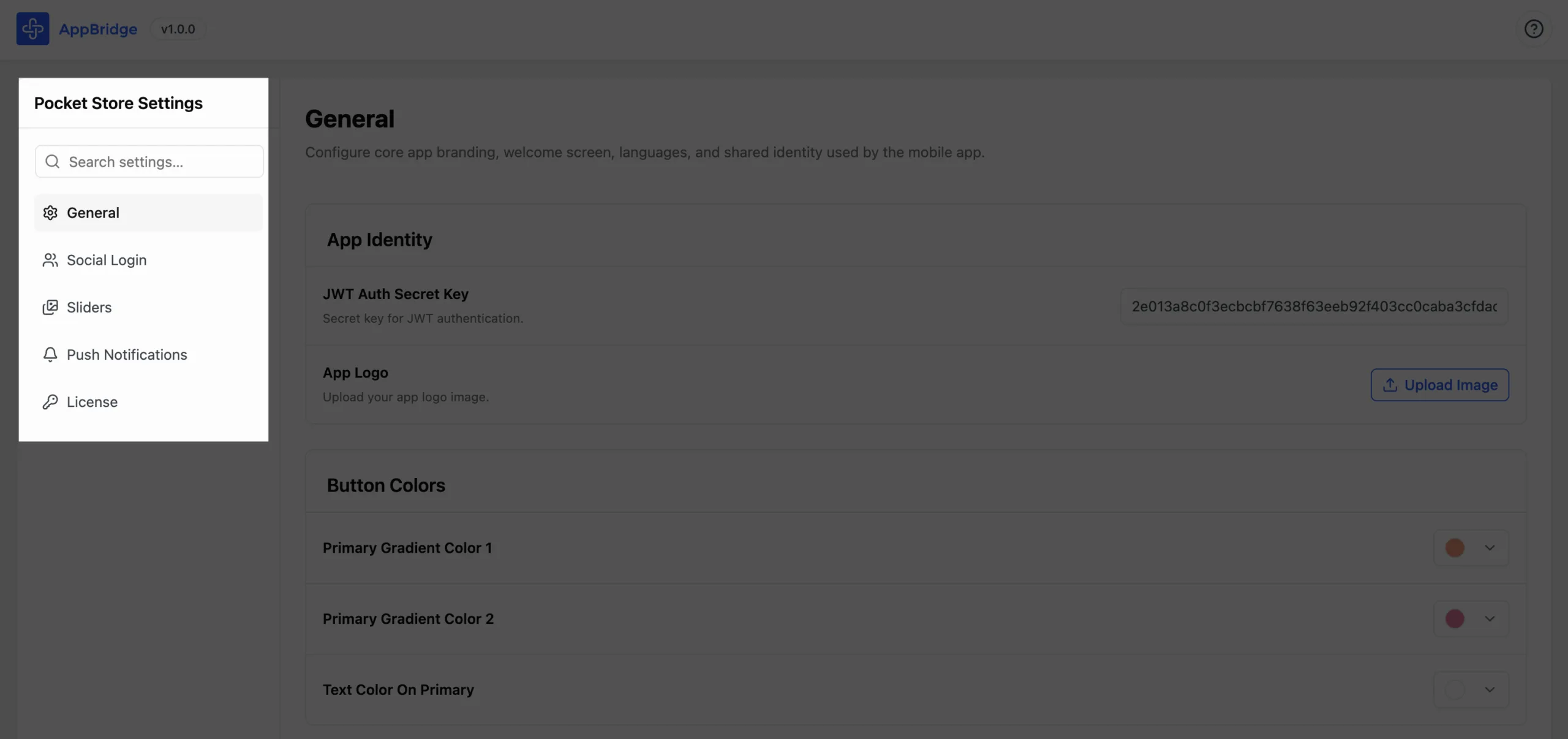
Each sub-menu manages a distinct area of your app configuration.
| Sub-menu | What it controls |
|---|---|
| General | App logo, tagline, welcome screen image and text, button colors, page mappings (About Us, Contact Us, Privacy Policy), and app languages |
| Social Login | OAuth credentials for Facebook, Google, Twitter, LinkedIn, and Apple Sign-In |
| Sliders | Home screen banner carousel: add, remove, reorder, and link banners |
| Push Notifications | OneSignal connection settings, lifecycle event toggles and message customization, and manual broadcast campaigns |
| License | License key status, number of activations remaining, and expiry date |